

Participating Frequently
July 2, 2025
Question

Move object to new layer moves object's entire original layer to new layer

  • July 2, 2025
  • 1 reply
  • 245 views

Trying to move this object.

Selecting target layer

Object's entire layer has been moved to target layer.
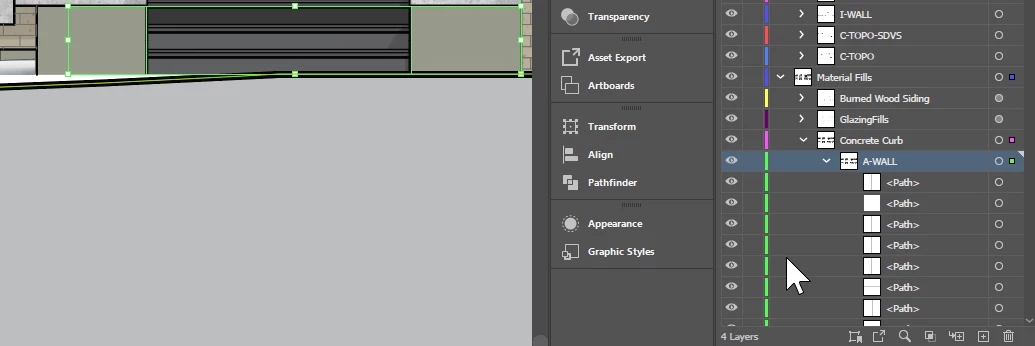
Why is this happening



1 reply

Abhishek Rao
Community Manager
Community Manager
July 2, 2025

Hi @abc-illustrator-fan,


Thanks for sharing the screenshots, that really helps. The reason your entire layer is moving instead of just the selected object is because you are clicking the small square target icon on the right side of the Layers panel. When you drag that target square to another layer, Illustrator moves the entire sublayer or group, not just the individual object you selected.

To move only one object, make sure you select the object directly on the artboard or in the Layers panel by clicking the small circle (selection indicator) next to the object, not the square target. Then drag that circle to the layer where you want to move it.

Could you also confirm which version of Illustrator and operating system you are using? If possible, please share a short screen recording showing exactly how you are trying to move the object. This will help us understand your workflow better and guide you more accurately.


Looking forward to your update!

Abhishek 

Participating Frequently
July 2, 2025

Thanks. I promise that I am selecting the object directly on the artboard.


Illustrator 2025 29.6.1

Anubhav M
Community Manager
Community Manager
July 2, 2025

Hello @abc-illustrator-fan,

I'm sorry to hear the suggestions did not help. To confirm the exact cause of the problem, could you share a detailed screen recording of your workflow and the problem, so I can check this with the team?

Looking forward to hearing from you.
Anubhav