

ELECTROHERMIT
Inspiring
August 4, 2022
Answered

Move only one handle of control point tuck back completely inside anchor

  • August 4, 2022
  • 2 replies
  • 559 views

Hi All, 
I see partial answers to this question online, but not a full answer. I'm sure it's been addressed before, but I cannot find the thread to save me. The ANCHOR POINT TOOL allows us to move one control handle at a time independently, I think I use to remember how to get one side, or one handle to tuck back into the anchor point, completely hidden in a snapping manner. Currently if I use the anchor point tool to move one handle point back into the little square I'm eye balling it back to 0,0 and I'm guessing there is a hot key or additional key to hold down with the anchor point tool to get it to quantize snap and hide completely inside the anchor point. Or maybe I'm going about this entirely in the wrong manner in the first place. Any suggetions? Thanks 

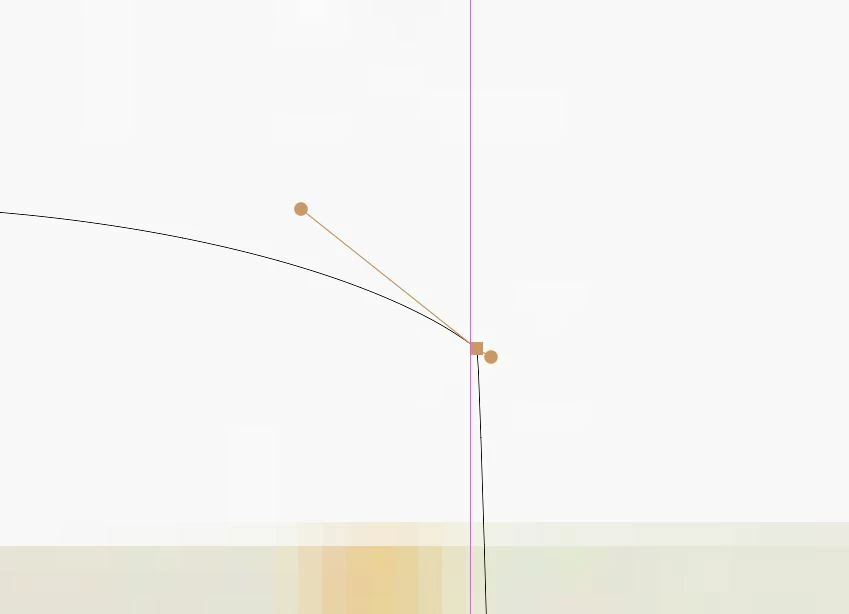
ATTACHED IMAGE: In the image below, as an example, I want to drag the shorter handle, tuck or retract it back fully into the little anchor point square, so it snaps fully out of sight. 

This topic has been closed for replies.
Correct answer Monika Gause

Just click the handle with the anchor point tool does not work?

2 replies

Monika Gause
Community Expert
Monika GauseCommunity ExpertCorrect answer
Community Expert
August 4, 2022

Just click the handle with the anchor point tool does not work?

ELECTROHERMIT
Inspiring
August 4, 2022

That's it Monika, thanks. I knew it was something simple, I was trying to add a second key to the click when its just a simple click, mystery solved. 

Jacob Bugge
Community Expert
Community Expert
August 4, 2022

Electrohermit,


Smart Guides are your friends (View dropdown). You can choose how much they are (over)doing.


ELECTROHERMIT
Inspiring
August 4, 2022

Smart guides are great, but I've found over the years, when drawing complex shapes I move faster just turning off smart guides. Smart guides work great in the early foundation of a file, but with finer details, I eventually switch it off. Thanks for the tip. 

Jacob Bugge
Community Expert
Community Expert
August 5, 2022

Electrohermit,


I apologize for my sloppy (non reading main part) viewing of the question, assuming a continuous workflow with the Direct Selection Tool (just seeing the heading, the image, and the second paragraph spotting the word "snaps").


For accuracy of finer details I like the easy snapping with Smart Guides; you can set a low snapping tolerance. I agree that Smart Guides can sometimes be disturbing, like a chatter.