

Gallucci Art
Known Participant
July 10, 2022
Answered

movement of a shape is jumpy, not smooth?

  • July 10, 2022
  • 2 replies
  • 4906 views

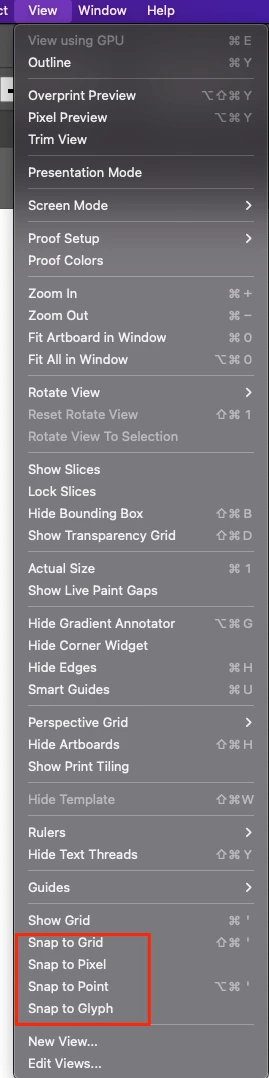
When I move a shape or line with any of the selection tools, the shape jumps rather than moving smoothly. I cannot line up an anchor point exactly on to a line segment, or on to another anchor point, it jumps to far, there's no smooth movement??? Going nuts here.


Correct answer Anshul_Saini

Hi @Gallucci Art,


Thanks for reaching out. This generally happens when snapping is enabled. As Ton suggested, try unchecking all the "Snap to" options from the View Menu.

Kindly update the discussion if you still need assistance with it. We'd be happy to help.


Regards,

Anshul Saini

2 replies

Anshul_Saini
Community Manager
Anshul_SainiCommunity ManagerCorrect answer
Community Manager
July 18, 2022

Hi @Gallucci Art,


Thanks for reaching out. This generally happens when snapping is enabled. As Ton suggested, try unchecking all the "Snap to" options from the View Menu.

Kindly update the discussion if you still need assistance with it. We'd be happy to help.


Regards,

Anshul Saini

Participant
February 14, 2024

THANK YOU SO MUCH!

Ton Frederiks
Community Expert
Community Expert
July 10, 2022

Did you check if any of the Snap to options are checked in the View menu?