
Participating Frequently
March 30, 2021
Answered

moveToBeginning() does move nothing but half of item .....WTF is this;

  • March 30, 2021
  • 3 replies
  • 1219 views
hello 
 
im trying to move pathItems that each has a common appearence into the layer had made on time start beggning script 
 
im using moveToBeginning() 
but it moves item but nothing half of items 
i dont know why happen such a thing....
 
finally , just i want to do is moving all particlar pathitems to another layer
thank you for anything help
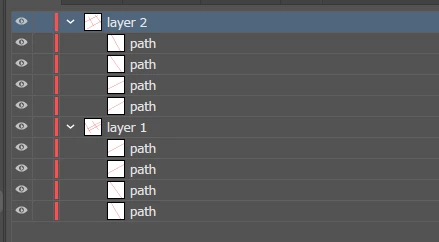


↑Script RESULT
 
↓Test SCRIPT
var parentLay = app.activeDocument.layers;
var Layer = app.activeDocument.layers.add();
 
 function DoSomeThing() {
            for (var j = 0j < parentLay[1].pageItems.lengthj++) {
                //↓moveToBeginning move nothing but half of pageitem ...why?
                parentLay[1].pageItems[j].moveToBeginning(Layer);
            }
 };
 DoSomeThing();


This topic has been closed for replies.
Correct answer femkeblanco
var parentLay = app.activeDocument.layers;
var oldLayer = parentLay[0];
var Layer = app.activeDocument.layers.add();
function DoSomeThing() {
    for (var j = oldLayer.pageItems.length - 1; j > -1; j--) {
        oldLayer.pageItems[j].moveToBeginning(Layer);
    }
};
DoSomeThing();

3 replies

Disposition_Dev
Legend
March 30, 2021

In case anyone is wondering why this happens, let's look at an example. OP's code used moveToBeginning(), which I'm going to replace with splice() since they both remove something from the array so the results are the same.


let's use the following array:

var fruits = ["apple", "banana","pear", "pineapple"];

Now let's say i want to remove each item of the array. A for loop is a great candidate for the job. Have a look at the following loop, and the outputs.

for(var i=0; i<fruits.length; i++)
{
    $.writeln(fruits.join(", ");


    //this removes 1 element from the array at index i
    fruits.splice(i,1); 
}
//results
//i = 0 : "apple, banana, pear, pineapple"
//i = 1 : "banana, pear, pineapple"
//i = 2 : loop condition false because after removing 2 items, fruits.length = 2, which is not less than the current value of i, even though we haven't processed all the elements. the current contents of fruits is: ["banana, pineapple"]. (i = 2) is not less than (fruits.length = 2)
//i = 3 : script never gets here even though there were 4 elements in the array at the beginning of the loop


So wait. What happened there? Why didn't banana get removed on the second iteration of the loop? And why did the loop exit before processing all of the elements?


On the first iteration of the loop,


var fruits = ["apple", "banana","pear", "pineapple"];

element index 0 is removed because i = 0;


On the second iteration of the loop,


var fruits = ["banana","pear", "pineapple"];

element index 1 is removed because i = 1; since "apple" was removed, "banana" got shifted to the left and is now at index[0], but because of the loop variable being incremented, you're not removing "banana" as expected, you're removing "pear".


on the third iteration of the loop,


var fruits = ["banana", "pineapple"];


fruits.length = 2, and i = 2. (i < fruits.length) = false. exit loop


Hey! that's half the array being left behind! Ok. Cool. So now we know why a forward for loop doesn't work. So what can we do about it? As @m1b pointed out, reversing the loop and traversing the array "backwards" eliminates the problems that we saw above. Since the elements will be removed from the end to the beginning, no elements get shifted and their indexes remain consistent and predictable. So let's look at the same example above, but with a backwards for loop:


for(var i = fruits.length - 1; i >=0; i--)
{
    $.writeln(fruits.join(", ");


    //this removes 1 element from the array at index i
    fruits.splice(i,1); 
}
$.writeln("fruits.length = " + fruits.length);
$.writeln("fruits.join(', ') = " + fruits.join(", ");
//results
//i = 3 : "apple, banana, pear, pineapple"
//i = 2 : "apple, banana, pear"
//i = 1 : "apple, banana"
//i = 0 : "apple"
//"fruits.length = 0"
//"fruits.join(', ') = ''"


This time you can see that each element gets taken from the end of the array, leaving the other elements undisturbed until it's their turn to be yanked out (or skipped over based on some condition).


The same principles apply even if you are only moving/removing some elements of an array. If you start at the front and remove something, you may skip over something that you're looking for. So, any time you're going to be adding or removing elements during a loop, you're usually better served going backwards. 


femkeblanco
Legend
March 30, 2021

@Disposition_Dev  I tried to explain this before.  I don't think I did a good a job as you. 


https://community.adobe.com/t5/illustrator/objects-names-to-a-text-block/m-p/11726592#M258101


femkeblanco
femkeblancoCorrect answer
Legend
March 30, 2021
var parentLay = app.activeDocument.layers;
var oldLayer = parentLay[0];
var Layer = app.activeDocument.layers.add();
function DoSomeThing() {
    for (var j = oldLayer.pageItems.length - 1; j > -1; j--) {
        oldLayer.pageItems[j].moveToBeginning(Layer);
    }
};
DoSomeThing();
DD5FF0Author
Participating Frequently
March 30, 2021

Thank you for everything! (;c;)

DD5FF0Author
Participating Frequently
March 30, 2021


it had succeed , thank you very much every person......!

m1b
Community Expert
Community Expert
March 30, 2021

The problem is most likely due to the was the way pageItems object works. The references it stores will point to the wrong objects when you move them around the document. (I know! It's surprising!)


With your for loop, going backwards through the list usually works. Start from length -1 and go down to zero; j--.

DD5FF0Author
Participating Frequently
March 30, 2021

Thanks a lot!! (;_;)