
Known Participant
December 20, 2024
Answered

moving overlapping nonlinear paths

  • December 20, 2024
  • 3 replies
  • 282 views

good morning,

may be the subject title need to be corrected cause of my english...

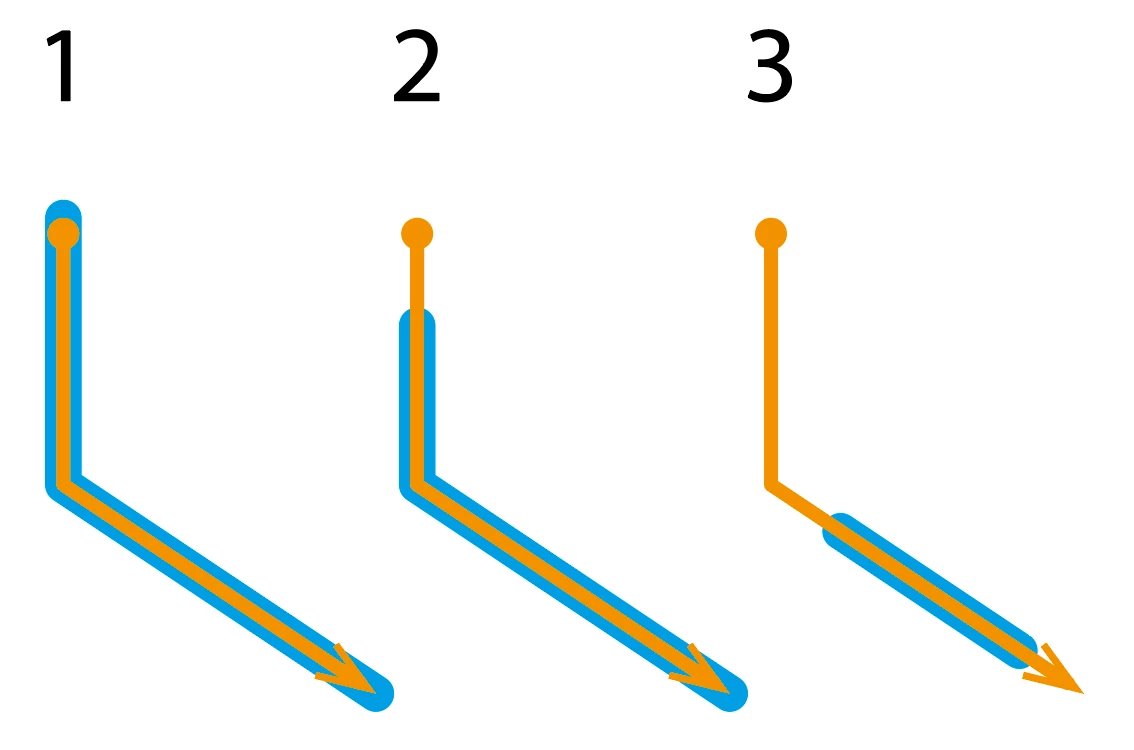
anyway, I need to know an efficient mode to shift the cyan trace from point 1 to point 3.
I mean using the Appearance window.

I'm able to doit with linear trace (with transform effect) not in case of non linear trace.
I try with dotted line without success.
 

This topic has been closed for replies.
Correct answer Kurt Gold

Assuming your example №3 is usually what you're looking for, creating custom Art Brushes or Pattern Brushes may be easier than using multiple strokes in the Appearance palette.


Another option may be Objects on a Path objects with just one object on the path.

3 replies

Kurt Gold
Community Expert
Kurt GoldCommunity ExpertCorrect answer
Community Expert
December 20, 2024

Assuming your example №3 is usually what you're looking for, creating custom Art Brushes or Pattern Brushes may be easier than using multiple strokes in the Appearance palette.


Another option may be Objects on a Path objects with just one object on the path.

Known Participant
December 20, 2024

ok, playing with dotted line it seems I'm getting closer to my goal:


there is just a little unwanted effect (the green line thinner than 0.05 pt), but it is not a problem in my specific case:


Monika Gause
Community Expert
Community Expert
December 20, 2024

The plugin Nudge Panel can move dashes: https://rj-graffix.com/downloads/plugins/