


Participant
May 29, 2025
Question

Multiple variables in one document

  • May 29, 2025
  • 1 reply
  • 118 views

I want to have multiple independent "variables" in one illustrator file 

For example, I have 4 different ones per page, and multiple pages. I want all of them to bechanged indepedently from one another and for them all to be visible at the same time in the document.
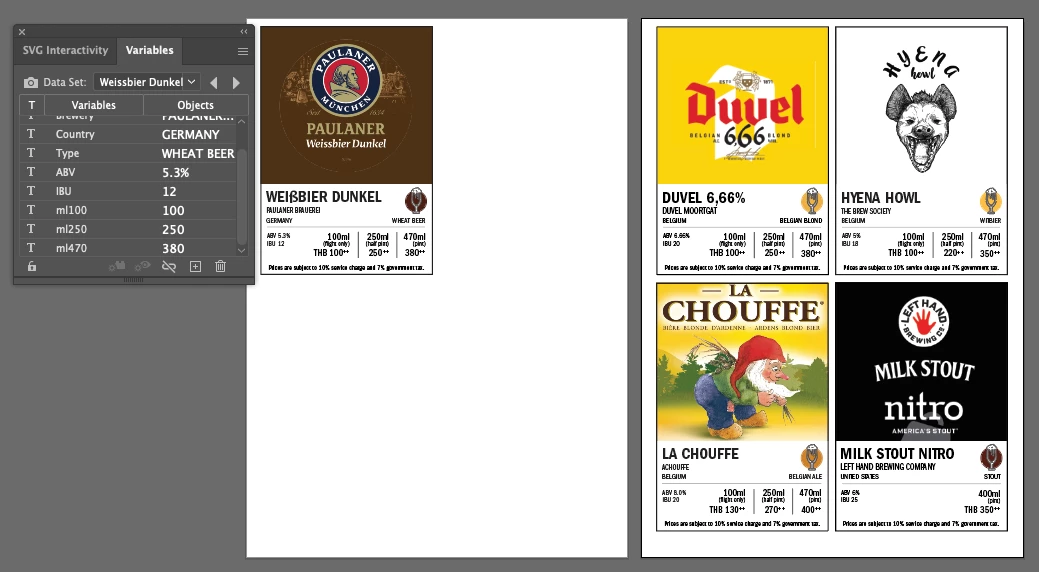
 

Is this even possible?

1 reply

creative explorer
Community Expert
Community Expert
July 3, 2025

@praeh_vijitakula not really. The built-in Variables panel is primarily designed to change the entire document (or specific linked objects) based on a single dataset. You can't easily have multiple independent "sets" of variables changing simultaneously and visibly on the same page without a lot of manual work or scripting. The only approach is to manually duplicate and edit each product block. The "Variables" panel in Illustrator is not designed for this "live, independent multiple instance" functionality within a single view but rather for generating variations from a dataset.

m