
Participant
September 6, 2017
Answered

Multiply Blend Mode Causing Issues

  • September 6, 2017
  • 1 reply
  • 443 views

If I were to add a drop shadow to an object, it defaults to multiply which gives the best effect. But in the last 2 weeks or so it started doing this......
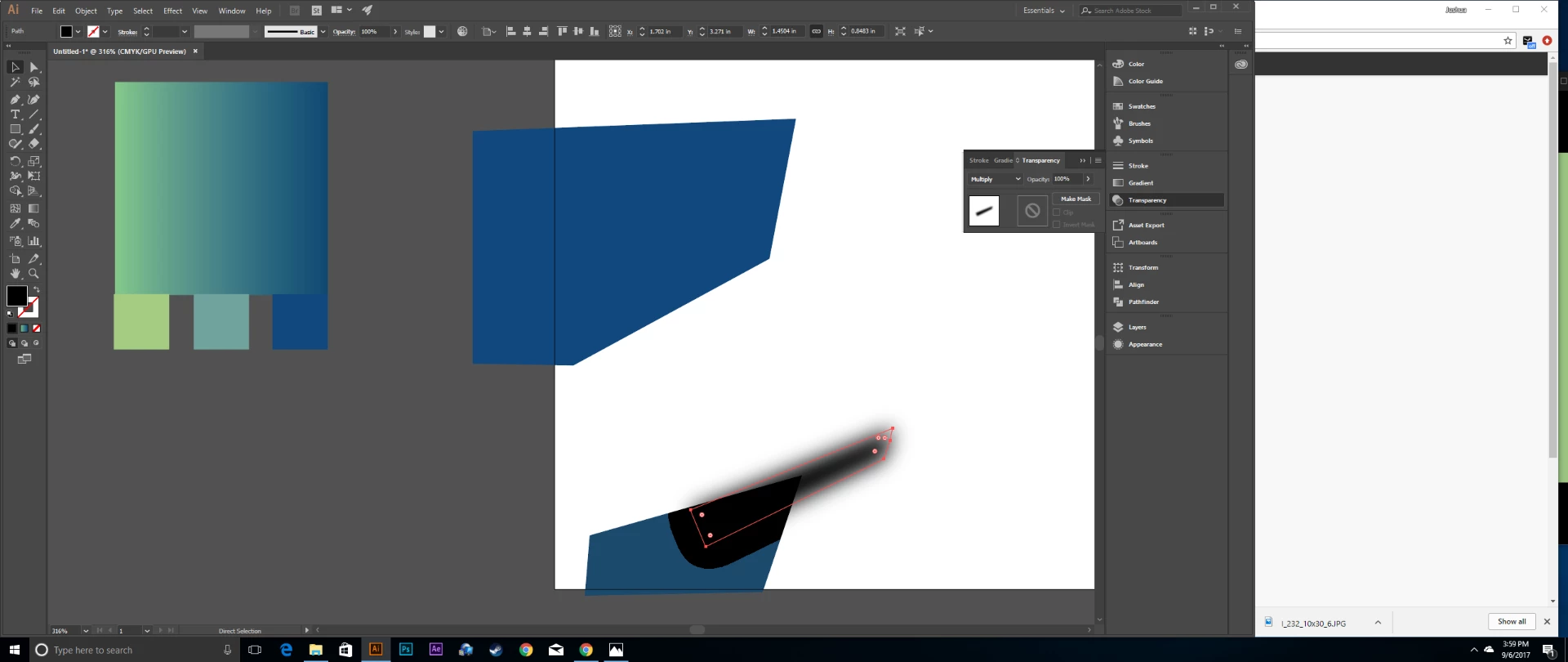
If there is another object behind the drop shadowed layer it causes this effect. Only blend mode that does not do this is Normal. I have tried to uninstall and reinstall, no luck there. Also if I save the file it looks completely normal, this only happens in Illustrator CC

My PC Specs are: 24GB of DDR3 1866, AMD FX 8300 Series 8 Core Processor, Gigabyte R9 285 Graphics Card.

    This topic has been closed for replies.
    Correct answer Monika Gause

    Try View > Preview on CPU.

    1 reply

    Monika Gause
    Community Expert
    Monika GauseCommunity ExpertCorrect answer
    Community Expert
    September 6, 2017

    Try View > Preview on CPU.

    Participant
    September 6, 2017

    You are a god! So because I have switched to CPU Mode that means my graphic card is likely the issue?

    Monika Gause
    Community Expert
    Community Expert
    September 6, 2017

    Yes, that looks like so.

    Could also be that there is a newer driver available that solves the issue.