


Participating Frequently
December 11, 2017
Answered

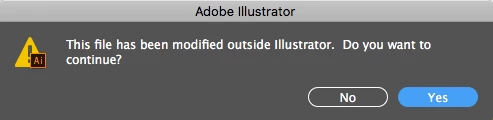
My file has not been modified outside of Illustrator!

  • December 11, 2017
  • 14 replies
  • 20481 views

I keep getting this dialog box when I try to save various files, but the documents have definitely not been modified in any other program. I'm not even renaming these files elsewhere. Does anyone know why I keep getting this message, and what I can do to stop it? I continue saving the file anyway, but it's getting irritating to keep seeing the dialog box so frequently, and it's disrupting my workflow quite a bit when it shows up multiple times throughout the course of trying to save a project.
This topic has been closed for replies.

14 replies

Participating Frequently
December 18, 2017

I'm having the same issue and my files are on DropBox. I definitely think it's an issue with High Sierra and how files are syncing. I'm not sure if your desktop is doing this or not, but Apple added a "feature" that syncs the desktop files across your devices through iCloud. So if my files are doing it with DropBox syncs and yours are doing it with a syncing desktop then that leads me to believe the files may be "touched" by the system after a save to sync them. Then Illustrator sees the file as being touched by something else and gives the error.

Known Participant
December 19, 2017

Paul thanks for the suggestion, but the two computers are not even signed in to ICloud. We also have the Creative Cloud Sync turned off in the preferences for Creative Cloud.  I agree that it sure looks like something in High Sierra, since we did not have this issue until this OS update. Not sure if it's Apple or Adobe's problem. If you have any other suggestions let us know.

Thank You

Known Participant
December 15, 2017

We're having the same issue after High Sierra was loaded on two different Macs. We are working on our desktop and are not using the new file system in High Sierra? Any suggestions would be appreciated.

JonathanArias
Legend
December 11, 2017

I have had that happen to me often when opening illustrator files from a share drive on a server.

vpage1342Author
Participating Frequently
December 11, 2017

This is not on a shared drive, all the files are located directly on my desktop

Monika Gause
Community Expert
Community Expert
December 11, 2017

Do you use the new file system in High Sierra?

Monika Gause
Community Expert
Community Expert
December 11, 2017

WHich version, which system? And where is the file located?

vpage1342Author
Participating Frequently
December 11, 2017

CC 2018 for Mac. All files are in a folder on my desktop.

Monika Gause
Community Expert
Community Expert
December 11, 2017

Which system? Is that High Sierra?