


Participant
July 5, 2023
Question

My masked picture loses transparency after being exported

  • July 5, 2023
  • 2 replies
  • 467 views

I am currently working on adding textures and one of my background (a rectangle) is masked and I place two images inside which is a texture and a logo. After exporting as a PNG, the images loses its opacity or dulls.


This picture is from my artboard
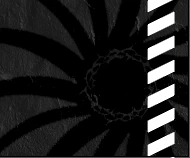
 

This picture is what I have after being exported



This topic has been closed for replies.

2 replies

Lukas Engqvist
Community Expert
Community Expert
July 6, 2023

PNG only supports simple transparency. First do you have your colour management set to general purpose (sRGB should be your RGB if your goal is PNG). Do you want the symbol to be visible on a transparent black or grey on black? Try using more contrast to test how it works.

It is hard to tell from your screen shot if it is a Gamma problem or a transparency problem.  Are the white parts transparent?

Participant
July 6, 2023

oh nevermind, I found the problem. I think it was because my images turned transparent after masking. My solution was adding another white fill rectangleand putting it behind to keep the opacity of my picture. Thank you so much for your help!

Ton Frederiks
Community Expert
Community Expert
July 6, 2023

Good to hear you found the reason for your problem, yes, opacity masks can create translucent areas.

Ton Frederiks
Community Expert
Community Expert
July 5, 2023

Can you show your object when it is selected with a fully expanded layers and appearance panel?

Participant
July 6, 2023

Here it is, I hope you could help me with this problem

Ton Frederiks
Community Expert
Community Expert
July 6, 2023

I cannot detect a reason for the problem. Can you check the settings for PNG export?

Try to copy the objects into a new file (sometimes a file gets corrupted.)