melissas27092582
Participant
December 16, 2018
Answered

My outlines didn't come out when I expanded. What should I do?

  • December 16, 2018
  • 3 replies
  • 637 views

I've just started out with Illustrator recently, so I'm still new at it. I recently drew up an image, and scanned it onto my computer. This is my second time expanding it. The first time I did it was when it was just a sketch, and it turned out white. I thought actually inking it would help, and it did some, but it didn't come out fully. Is there any way to fix this?

This topic has been closed for replies.
Correct answer michelew83603738

I am not sure how you created your trace and having good thicker lines can help, but you can do some things. Did you play with the settings at all before expanding or just go for the default settings?

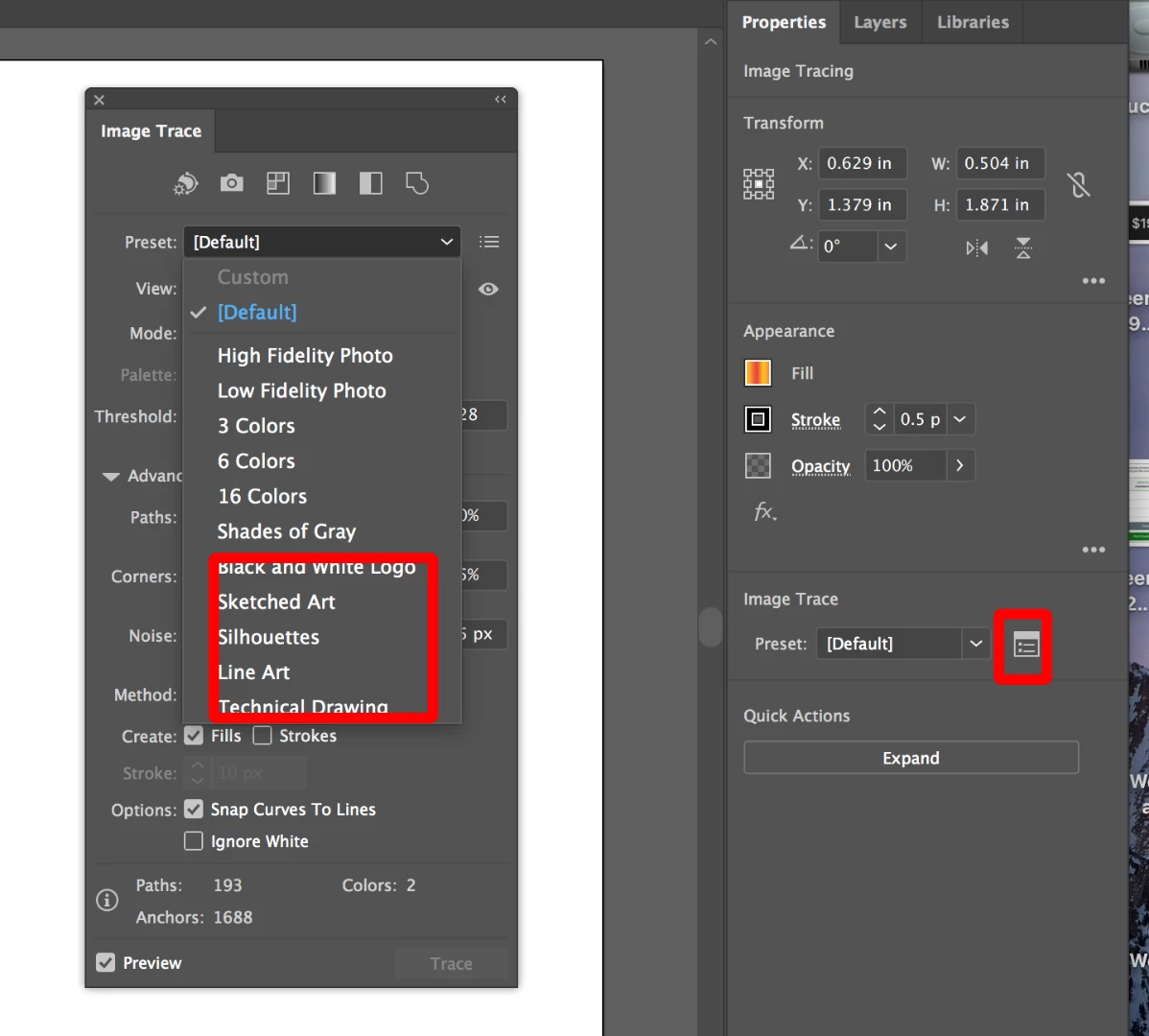
Try seeing if you get better settings if you try line work, etc. Click on the menu next to the default to bring up options.

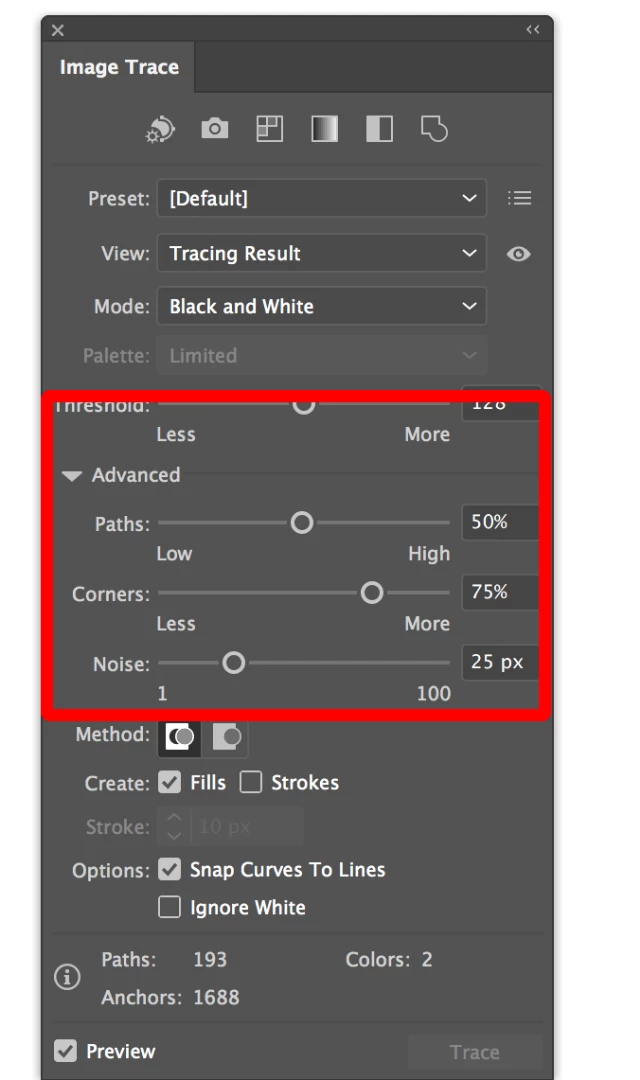
Then you can click on the advanced settings and try to further refine your lines by adjusting your corners, path, etc. You might hit on a better combo before you expand.

3 replies

KShinabery212
Community Expert
Community Expert
December 16, 2018

This link is just an example of how I turn a pencil illustration into a graphic using Adobe Illustrator.

Kenneth Shinabery - Not Your Average Princess Digital Vol. 1

I scan or photograph the pencil art and set it as a 'Template' in my Layers window.

Then I create new layers and build on top of it.

One thing I noticed is to try to keep the same size or shape of line in the same layer.  Then expand each layer with similar lines separately.  Because if you expand them all at once some will default back to a standard line.

More recently I had to go back into an illustration and correct this as I forgot to expand one line separately so it lost its settings and became the normal shape of default line.  If that makes sense.

And trust me I expand all my lines as I use Live Paint often.

In my portfolio you will see other examples as well.  Granted there are times I draw directly on the computer.  But a lot of times I will start from a pencil illustratio and then bring it into Illustrator.

Let's connect on LinkedIn. https://www.linkedin.com/in/kshinabery/
melissas27092582
Participant
December 18, 2018

Thanks, I understand what you meant. I've used a couple drawing/painting programs, so I got a sense of how layering works.  How would I expand the lines individually? I've just been using image trace and expand so far.

michelew83603738
Community Expert
michelew83603738Community ExpertCorrect answer
Community Expert
December 16, 2018

I am not sure how you created your trace and having good thicker lines can help, but you can do some things. Did you play with the settings at all before expanding or just go for the default settings?

Try seeing if you get better settings if you try line work, etc. Click on the menu next to the default to bring up options.

Then you can click on the advanced settings and try to further refine your lines by adjusting your corners, path, etc. You might hit on a better combo before you expand.

melissas27092582
Participant
December 16, 2018

Thanks, I went to image trace> make, then I tried out the presets. I used technical drawing, which may of been wrong. Though I didn't go into the advanced settings. That'll probably help. After I expanded I noticed it was at default, so I probably messed up somehow. I wasn't for sure if it was registering my pencil lines properly, so I thought inking would help.Now that sounds silly. Well the inked version looks better anyways.  I'm just learning as I go lol.

Monika Gause
Community Expert
Community Expert
December 16, 2018

THe technical drawing preset is meant to produce that kind of drawing.

Try the Black and White preset as a start.

Monika Gause
Community Expert
Community Expert
December 16, 2018

Please show the source file.

And please explain what you expect to happen with it.