
Participant
February 19, 2023
Answered

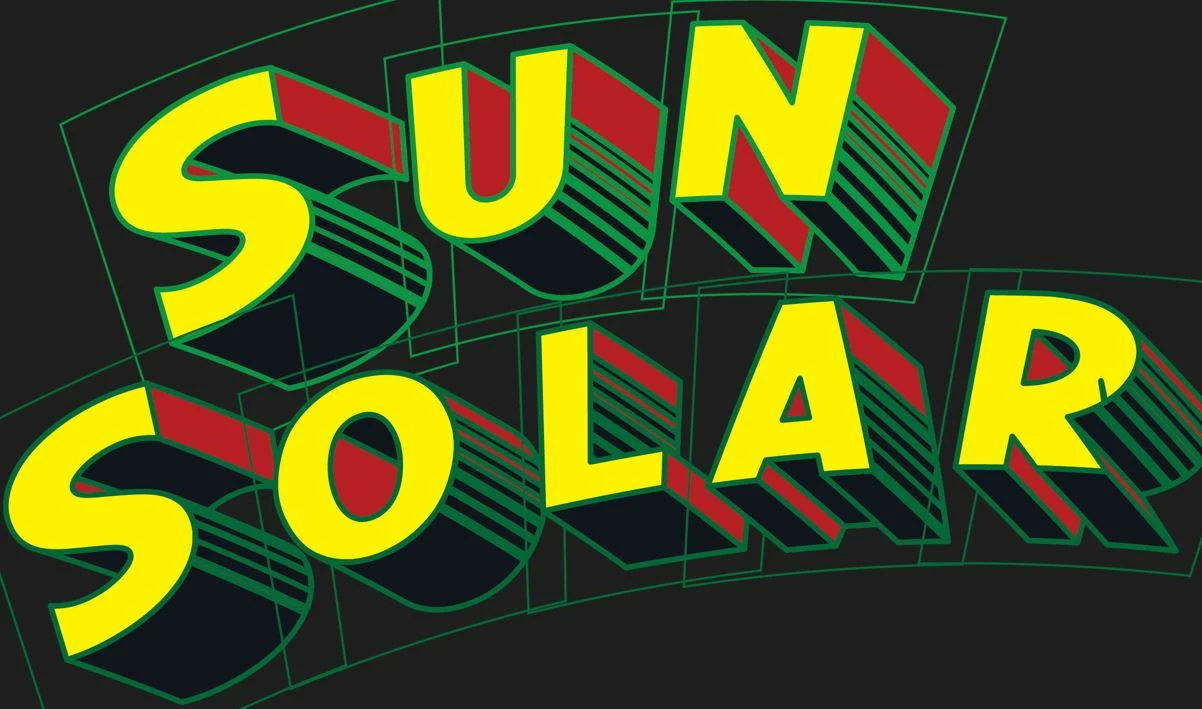
My vectored font has a border around each letter

  • February 19, 2023
  • 3 replies
  • 1052 views

I took the Adobe provided vectored comic font. For some reason, reach letter rendered with a border around it. I tried to erase the border, but all that does is change it's shape. 


How do I get rid of these borders?
 

This topic has been closed for replies.
Correct answer Monika Gause

You applied a 3D effect? And then outlined it?

All the shapes have a green stroke applied. You can just select them all and set the stroke to None.

3 replies

Monika Gause
Community Expert
Monika GauseCommunity ExpertCorrect answer
Community Expert
February 19, 2023

You applied a 3D effect? And then outlined it?

All the shapes have a green stroke applied. You can just select them all and set the stroke to None.

PrestonpAuthor
Participant
February 19, 2023

Thank you. Setting the stroke to 0 solved the problem. 

Monika Gause
Community Expert
Community Expert
February 19, 2023

Glad you could solve it!

Simmer1
Community Expert
Community Expert
February 19, 2023

Hey,


Are you able to post a screenshot including your Layers Palette?

Rene Andritsch
Community Expert
Community Expert
February 19, 2023

Is this a font from Adobe Fonts? Are the letters grouped. Do they consist of Clipping Paths?