Participant
March 9, 2023
Answered

Não consigo exportar minhas imagens em PNG no Illustrator

  • March 9, 2023
  • 4 replies
  • 2363 views

Preciso exportar alguns vetores em PNG sem fundo, porém um aviso aparece e não me permite salvar os arquivos em PNG:
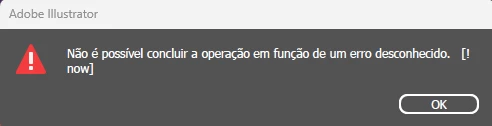


O que poderia ser? 

Como posso corrigir isso?


Obrigada!

This topic has been closed for replies.
Correct answer Julia.o.Fontana

Updating my Illustrator to the latest version solved the problem, thank you very much!

4 replies

Participant
October 26, 2023

Estou com o mesmo problema, o aplicativo está atualizado. Por favor me ajuda

Anshul_Saini
Community Manager
Community Manager
October 26, 2023

Hello @Bianca33171139vaa1,


I am sorry to hear about the challenges you've been experiencing when attempting to export your PNG images in Illustrator. 

To provide you with the most effective assistance, would you be willing to share a sample AI file with us? Additionally, could you please verify the resolution/ PPI settings in the export settings?


It's worth noting that sometimes, difficulties with PNG or JPEG exports may arise due to incorrect export settings. Therefore, ensuring that you've chosen the appropriate resolution (72ppi) and format in the export settings before initiating the export process is essential.


Rest assured, I'm here to support you and will make every effort to help resolve this matter. Please don't hesitate to share any further details or inquiries you may have.


Best regards,

Anshul

Participant
April 4, 2023

O meu está dando o mesmo problema. Já tentei desinstalar e instalar novamente, usar a ultima e também versões mais antigas, reiniciei o pc inumeras vezes e nada... Não consigo exportar nem em jpg, png, nada... não testei todos, mas de qualquer maneira só trabalho com png e jpeg então se o resto não estivesse funcionando mas esses sim eu nem perceberia.

Anshul_Saini
Community Manager
Community Manager
April 11, 2023

Hi @FalaGadu,


I understand that you are facing difficulties in exporting your PNG images in Illustrator, and it's frustrating to hear that you have already tried various solutions, such as uninstalling and reinstalling, using different versions, and restarting your PC without success. I can imagine how this issue is affecting your workflow and causing inconvenience.


In order to better assist you, would you mind sharing a sample AI file and confirming the resolution in the export settings?


Sometimes, incorrect export settings can result in issues with PNG or JPEG exports. Make sure that you have selected the desired resolution and format in the export settings before exporting the file.


I'm here to help and will do my best to assist you in resolving this issue. Please feel free to share any additional information or questions you may have.


Best,

Anshul

Participant
April 13, 2023
I already solved.. there was a corrupted file in it... once I deleted it
saved alright.

--
Anshul_Saini
Community Manager
Community Manager
March 11, 2023

Hello @Julia.o.Fontana,


I'm sorry to hear that you're having trouble exporting your vectors to PNG without a background in Illustrator. I understand how frustrating this can be.


To better assist you, could you provide me with the file that you're working on so that I can take a closer look at it? Also, are you getting any script errors message when you launch Illustrator?


Furthermore, I would recommend ensuring that you're using the latest version of Illustrator, which is currently version 27.3.1. If you're working on a Windows computer, please ensure your operating system is up to date.

Also, as Ton said, try unchecking the "Save in the background" & "Export in background" options in preferences. Let us know if this helps!


Once I have more information, I can provide you with more specific suggestions to help you fix this issue.


Best,

Anshul Saini

Julia.o.FontanaAuthorCorrect answer
Participant
March 13, 2023

Updating my Illustrator to the latest version solved the problem, thank you very much!

Ton Frederiks
Community Expert
Community Expert
March 9, 2023

How do you export, at what resolution, what is the size of your artboard?

Participant
March 10, 2023

My vector artwork is 800x800 px.
I go to File > Export > Export As > Save all the clipboards as PNG at 300 ppi resolution with a transparent background.

And then it loads up saying that it is generating the PNGs and then it says "the operation cannot be completed due to an unknown error.
I've tried lowering the resolution to less ppi, but it doesn't work. =/

Ton Frederiks
Community Expert
Community Expert
March 10, 2023

Where do you export? Local, server, cloud sync folder?

Did you try without Preferences > File Handling > Export in Background?