


Participant
February 15, 2019
Answered

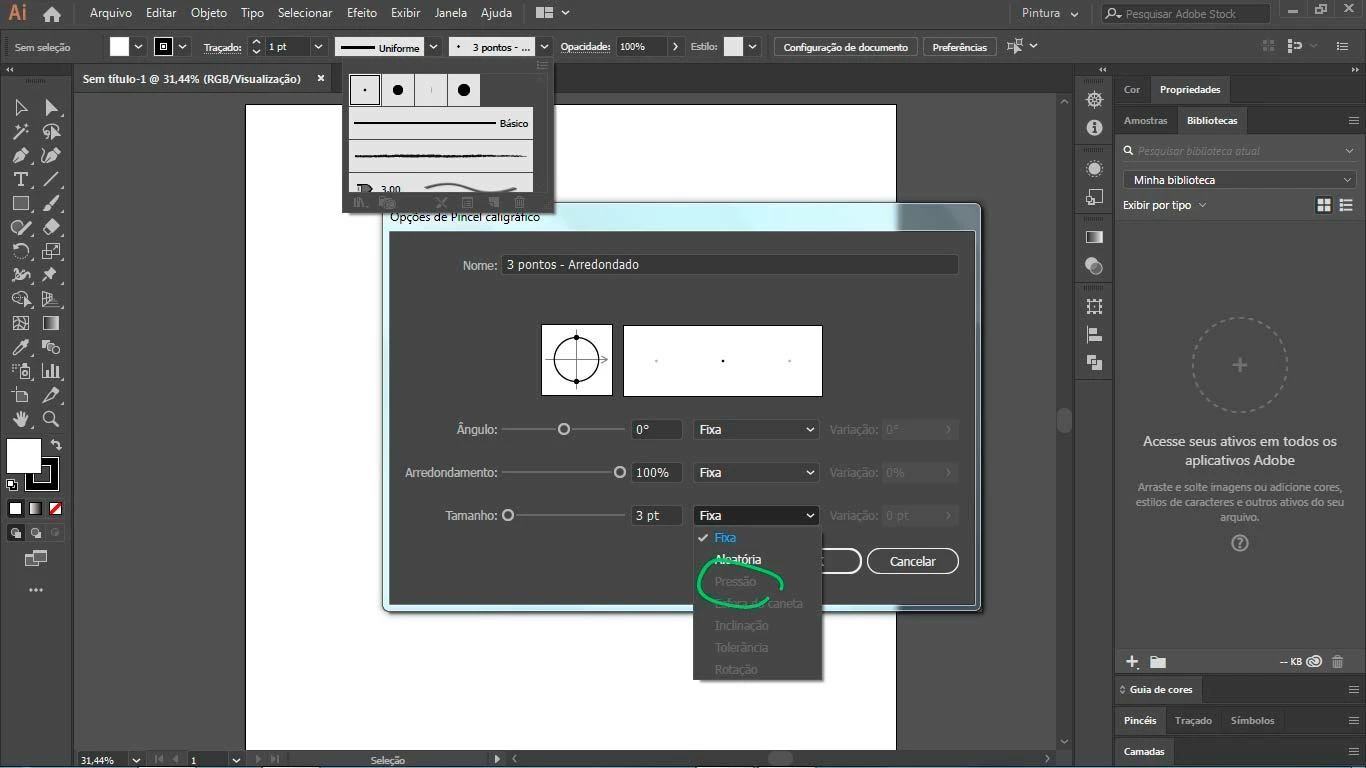
Não consigo selecionar o "Pressão". Já atualizei o Ai e atualizei os drivers do tablet, mas mesmo assim não consigo. Preciso de ajuda, por favor.

  • February 15, 2019
  • 5 replies
  • 788 views

Não consigo selecionar o "Pressão". Já atualizei o Ai e atualizei os drivers da mesa, mas mesmo assim não consigo. Preciso de ajuda, por favor.

Estou a uma semana pesquisando, assistindo vídeos e lendo sites de fóruns, mas não achei nada que me ajudasse.

Mesa digitalizadora: Bamboo da Wacom

Ai: CC 2019
    Correct answer Monika Gause

    When you open the tablet driver, you can control it? The system recognizes your tablet?

    Can you try and remove the Wacom preferences? There should be a Wacom application in your application folder to clean up this kind of stuff.

    5 replies

    Community Expert
    May 12, 2025

    If your computer is a Windows-based PC do you have Windows Ink enabled in the Wacom Tablet Driver? Usually Windows Ink must be enabled to allow a graphics tablet to have any pressure sensitive functions.

    Rondinele2334707679c0
    Participant
    February 26, 2022

    Não consigo selecionar o "Pressão". Já atualizei o Ai e atualizei os drivers da mesa, mas mesmo assim não consigo. Preciso de ajuda, por favor.

    Estou a uma semana pesquisando, assistindo vídeos e lendo sites de fóruns, mas não achei nada que me ajudasse.

    A minha mesa é uma XP PEN


    Participant
    February 21, 2019

    Muito obrigada!! Consegui resolver instalando o driver certo!!

    Participant
    August 31, 2021

    Qual era sua mesa? Eu tô com o mesmo problema e já atualizei dezenas de vezes 

    Srishti_Bali
    Legend
    February 20, 2019

    Hi Amanda,

    Sorry about this issue. Please try the steps shared here and let us know if that helps: Troubleshoot issues when using a Wacom tablet.

    Regards,

    Srishti

    ednilsonsilva
    Participant
    July 14, 2021

    Estou com esse mesmo problema , mas minha mesa não é Wacom e sim uma HUION HS64 estou com exatamente o mesmo problema alguém pode me ajudar.

    Participant
    July 21, 2021

    Conseguiu resolver, amigo?


    Monika Gause
    Community Expert
    Monika GauseCommunity ExpertCorrect answer
    Community Expert
    February 15, 2019

    When you open the tablet driver, you can control it? The system recognizes your tablet?

    Can you try and remove the Wacom preferences? There should be a Wacom application in your application folder to clean up this kind of stuff.
