
Known Participant
January 22, 2019
Answered

NEED ADVISE FOR BLEED AND CROP MARKS IN ILLUSTRATOR (URGENT)

  • January 22, 2019
  • 3 replies
  • 918 views

Hi there!

I will be really thankful if someone can spare some of their time and answer the questions below. It's really important that I have the answers as soon as possible as I am working with a client.

1. Is it necessary to have both Bleed and Crop Marks on the project at the same time?

2. If you have already created Bleed in the project, you should already have automatically created a Trim line, is that correct? (See the included image)
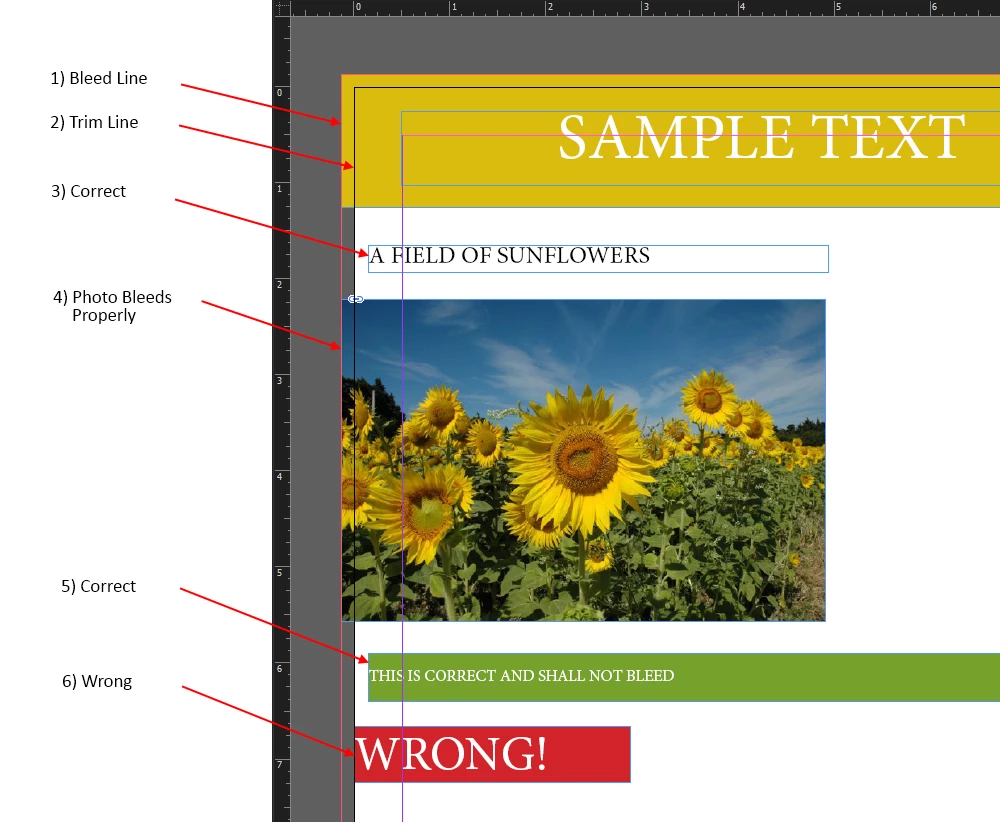
3. What is the usual recommended and most widely used bleed size for most projects?

Thank you for your time! ^^

This topic has been closed for replies.
Correct answer jdanek

Let me take a stab at your questions...

1. Is it necessary to have both Bleed and Crop Marks on the project at the same time?

- No.  Typically, no need for bleed marks or bleed lines, just trim marks.  I add my trim and score marks  manually.  Layouts can be done in any page layout program.  Keep in mind, the printer will tell you what they want.  Some just want the document size to include bleed with no trim marks ( not recommended ).  That allows them to add their own in their pagination software that usually uses PDFs as placement documents.

2. If you have already created Bleed in the project, you should already have automatically created a Trim line, is that correct? (See the included image)

- No.  Your example is not correct at all.  However, because you used it in your post, forget about any "lines" in your file.

3. What is the usual recommended and most widely used bleed size for most projects?

- 1/8".

Thank you for your time! ^^

- As already mentioned elsewhere, consult with your print vendor.

3 replies

jdanekCorrect answer
Inspiring
January 23, 2019

Let me take a stab at your questions...

1. Is it necessary to have both Bleed and Crop Marks on the project at the same time?

- No.  Typically, no need for bleed marks or bleed lines, just trim marks.  I add my trim and score marks  manually.  Layouts can be done in any page layout program.  Keep in mind, the printer will tell you what they want.  Some just want the document size to include bleed with no trim marks ( not recommended ).  That allows them to add their own in their pagination software that usually uses PDFs as placement documents.

2. If you have already created Bleed in the project, you should already have automatically created a Trim line, is that correct? (See the included image)

- No.  Your example is not correct at all.  However, because you used it in your post, forget about any "lines" in your file.

3. What is the usual recommended and most widely used bleed size for most projects?

- 1/8".

Thank you for your time! ^^

- As already mentioned elsewhere, consult with your print vendor.

Daniel E Lane
Inspiring
January 22, 2019

As Jonathan said, InDesign would be a much better place to create this. But in Illustrator, is your document set to the exact paper size you got from your printer? If not, all of those crop marks are essentially arbitrary. Talk to your printer, they will usually tell you the exact dimensions they want for bleed and crop and everything else.

Technically, you don't need any of those actual marks on the page, except maybe the crop marks, but those should be placed out in the bleed area as just small tick marks around the corners. No paper cutting is 100% accurate, so if you put on a line all the way down the page, and the cut is even slightly off, you can end up with a line down the edge of the paper.

JonathanArias
Legend
January 22, 2019

your printer will tell you want bleed they want.

however a 0.125 is a fine bleed. on number 3 and number 5 you are getting really close to where the paper gets gut. you should back that up.. other may have another opinion.

may i ask why are you not making layouts in indesign? that is the correct program for creating layouts.