
Participant
August 3, 2022
Answered

Need help, Bullet space setting on V.26.4.1

  • August 3, 2022
  • 2 replies
  • 689 views

Hi,

Need help for someone may know,

Question1 When I type 1. + space, it will automatic run number with more space 

How to set to narrow spacing?, I try to set on tabs tool but it can't.

Question2 How to remove this automatic? I want normal text for default.


I did not found this problem on the previous version.

Thanks.
This topic has been closed for replies.
Correct answer Anshul_Saini

Hi @Kwanwana25502826kog3,


Thanks for reaching out. For your second question, you may try the steps suggested by @Monika Gause


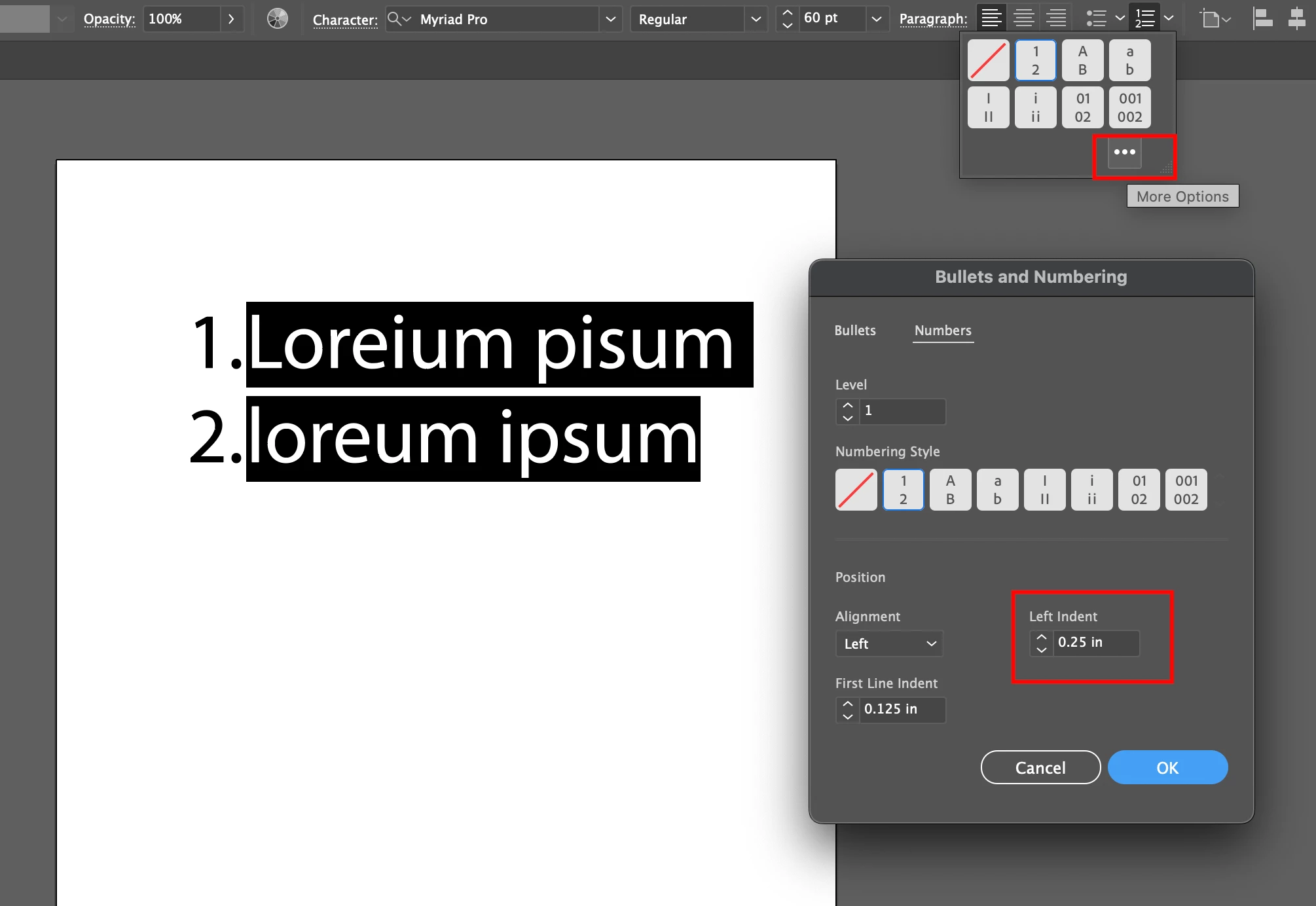
For your first question. Select the text > go to control bar/ Paragrpagh Panel > Click there dots (ellipsis) > Increase or decrease "Left Indent" value to get the more or less space. If you want a large gap/ space, you will need to select the none option (first option) under the numbering style. Then, enter the numbers and set as much gap as you desire between text & numbers.


I hope it helps!


Regards,

Anshul Saini

2 replies

Anshul_Saini
Community Manager
Anshul_SainiCommunity ManagerCorrect answer
Community Manager
August 9, 2022

Hi @Kwanwana25502826kog3,


Thanks for reaching out. For your second question, you may try the steps suggested by @Monika Gause


For your first question. Select the text > go to control bar/ Paragrpagh Panel > Click there dots (ellipsis) > Increase or decrease "Left Indent" value to get the more or less space. If you want a large gap/ space, you will need to select the none option (first option) under the numbering style. Then, enter the numbers and set as much gap as you desire between text & numbers.


I hope it helps!


Regards,

Anshul Saini

Monika Gause
Community Expert
Community Expert
August 3, 2022

Do you want to create a list?

Or do you want to type the numbers?

In order to undo the list, open the paragraph panel and turn off the list.


In order to turn off the automatic list, go into Preferences > Type and check off "Automatic Bulleted and Numbered list"