
Need Help Constructing an Asymmetrical Pattern Brush
Hi there, I've seen similar types of posts, but I don't think this is redundant. If it is, if someone could point me to a good resource, thatd be fantastic!
Ok, so I'm trying to learn how to create more ornate borders for some publishing work, and I've taken a liking to this type of treatment (different line treatments in a single border):
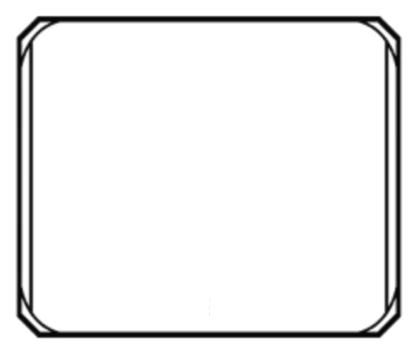
Now, I cannot for the life of me discern how to replicate this kind of thing. Varying stroke treatments for the top and sides, and corners that combine both.
Here's what I've tried so far:
I created what I thought were the three main pattern elements:
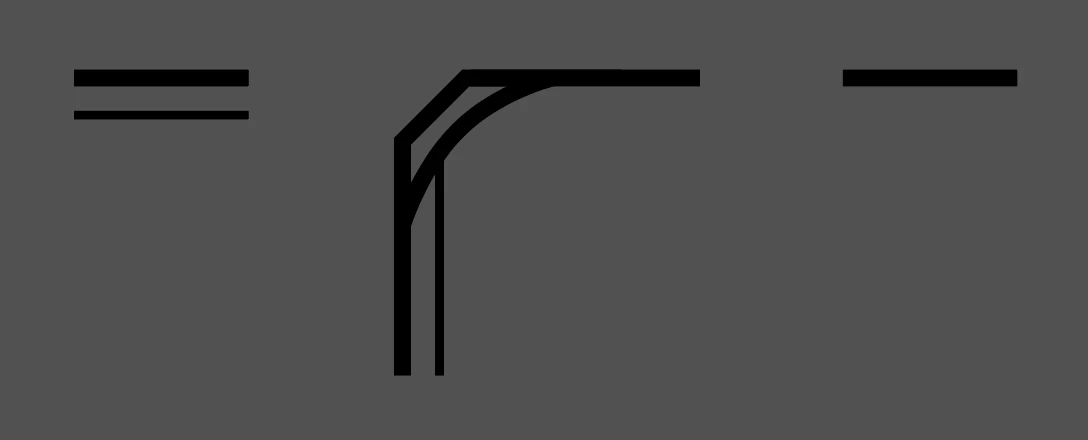
I added them as pieces to my swatch library, individually, and then created a new pattern brush:
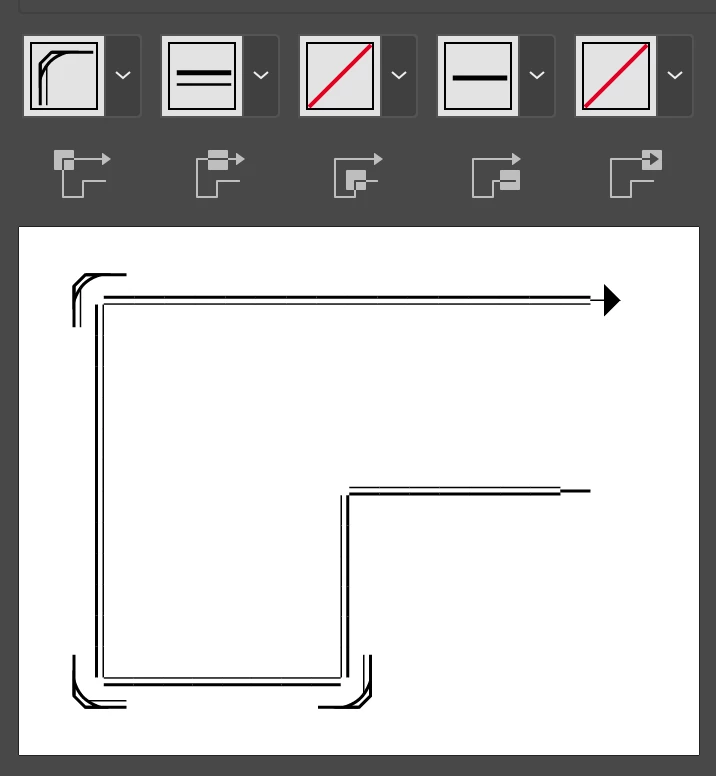
Now obviously that's way off, as there doesnt seem to be a way to specify if one edge gets a different line or not (double or single).
Here's the basics I can grasp:
- The corner piece is essentially "within" a perfect square
- The double and single line pieces need to be top/edge aligned and NOT centered within their respective pattern squares
- There is no way to use both the double and single line in a single pattern???
Any and all insights on how to accomplish the initially provided example would be so wonderfully appreciated, as I can see myself trying all different permutations of the concept.
Thank you so much!
 AdChoices