
Participant
September 5, 2018
Answered

need help creating Graphs!

  • September 5, 2018
  • 3 replies
  • 1842 views

Hi All,

Here's the deal, I need to create a total of 153 graphs that will be part of an infographic for each state.  There are 51 bar charts, 51 column charts, and 51 pie charts. 

Here is the infographic:
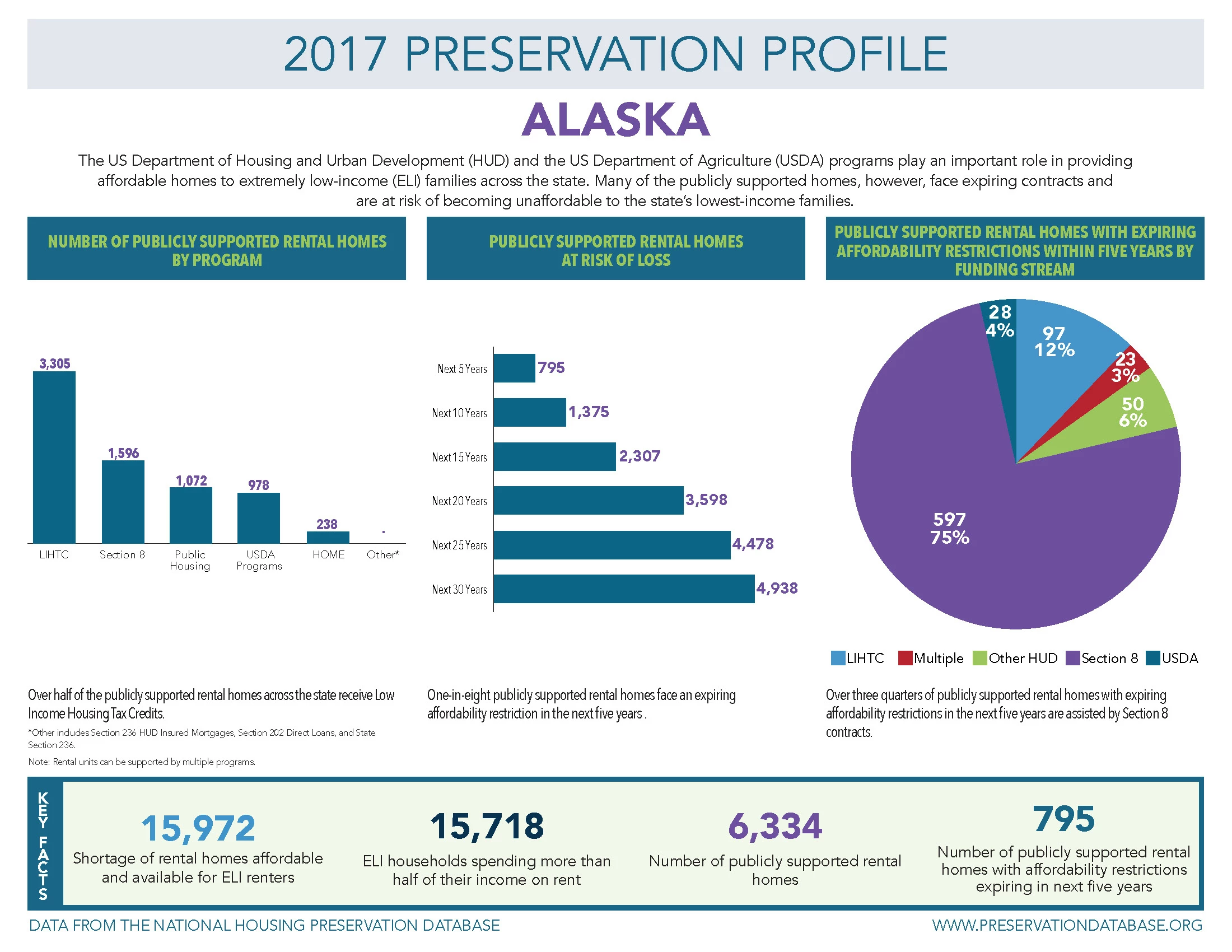
Last year, it took me 3 weeks to create each chart for each state.  I had to copy the chart from Excel, Paste into Illustrator and then stylize each one and save each individual chart.  Each chart is sized specifically to merge into Indesign along with the data points.  It was painstaking and arduous, but I got it done.

NOW, I have to redo all the charts again, however, i don't have as much as a window to get them done.  I've tried using the Illustrator Graph tool, but point plank, IT'S HORRIBLE.  For instance, on this chart below, I cannot remove the value axis, and for some reason I cannot add the value labels above the chart:
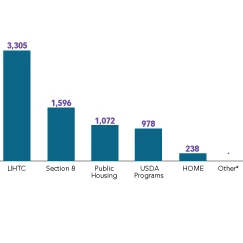
The other issue is that I received the Excel Table and each chart is a Pivot Chart, so when I try and do it old-school, it pastes in a format that I can't edit it.  What I am looking for is something EASY and SEAMLESS that will work with Illustrator. 

Are there any Plug-Ins that anyone knows of that can do this?  What about any Excel Extensions.  Any online tools out there for charts?  I'm at a loss here and I don't have 3 weeks to get these done.

Please help!!!!

    This topic has been closed for replies.
    Correct answer Srishti_Bali

    Hi Ellen,

    Please check out this video tutorial and let us know if that helps or if you need any further assistance.

    Creating Graphs in Adobe InDesign - YouTube

    Regards,

    Srishti

    3 replies

    Participant
    November 9, 2019

    Let's be real - that font, Chartwell, is expensive (I paid for it), it only works for whole numbers that aren't very numerically high (millions don't work for example), and because the company is out of the USA, support is pretty difficult to receive.  And since none of these limitations are documented ahead of time in the purchase process, you feel like you're getting deceived when you try to use it. 


    Adobe really needs to provide some better, native tools inside of InDesign for chart creation; having to break apart Illustrator charts and manually recreate all the labels just to be able to make them look nice is a terrible process.  If Microsoft software is a better benchmark for creating more appealing charts without a massive amount of effort, we've got some issues....

    Srishti_Bali
    Srishti_BaliCorrect answer
    Legend
    September 10, 2018

    Hi Ellen,

    Please check out this video tutorial and let us know if that helps or if you need any further assistance.

    Creating Graphs in Adobe InDesign - YouTube

    Regards,

    Srishti

    Participant
    November 9, 2019

    You gave a link to a third-party font that's expensive and severly limiting; is there any solution on the horizon?  

    OussK
    Community Expert
    Community Expert
    September 5, 2018

    Try export your charts from excel as PDF file than open this PDF in illustrator

    irNLIHCAuthor
    Participant
    September 5, 2018

    Thank you, but that's not quite what I need. Even if I do it that way, I still have to open each chart, remove all the clipping paths, stylize it, and change the fonts and the colors and resave as an eps.  What I want is to find a way so that I have the design already set up precisely they way I want it, and to Merge in the data to automatically create the charts.  Is there something like that???

    Monika Gause
    Community Expert
    Community Expert
    September 5, 2018