Participant
March 6, 2019
Answered

Need help on using the pen tool and making individual shapes (making a vector image)

  • March 6, 2019
  • 2 replies
  • 512 views

Hey guys, I really need some help with this one. I have a project due tomorrow morning and I think I got in a little over my head. Basically I traced a picture of Stan Lee and traced most of the fine details to make him into a vector illustration but I realized the shapes aren't whole when I finished. I've been searching on how to fix this issue for hours with no luck. It is hard to explain but I attached an image that may help explain a little better. I am sure its a common mistake but I was hoping there is a quick solution so I can get onto coloring each shape.
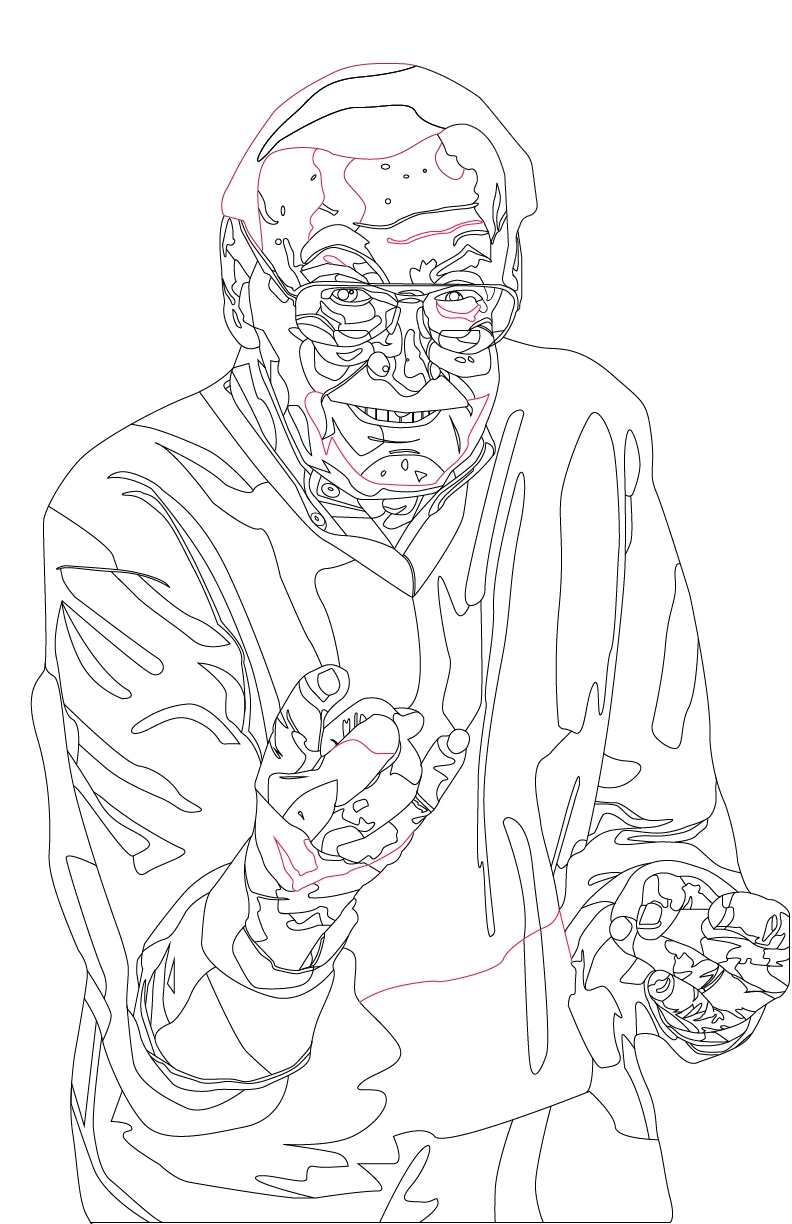
I colored some lines that are connected to the path of other lines but do not make a whole shape like I need. Is there an easy way to make every line it's own shape? Maybe by highlighting everything and expanding appearance or something? (I'm new to illustrator and may not know what I'm saying lol)

Thank you in advance for help.

    This topic has been closed for replies.
    Correct answer Michael Bullo

    I think Live Paint might be what you are looking for. Check this page out…

    How to create and work with Live Paint groups in Illustrator

    If you have any questions please follow up here.

    2 replies

    Michael Bullo
    Community Expert
    Michael BulloCommunity ExpertCorrect answer
    Community Expert
    March 6, 2019

    I think Live Paint might be what you are looking for. Check this page out…

    How to create and work with Live Paint groups in Illustrator

    If you have any questions please follow up here.

    Participant
    March 6, 2019

    This is exactly what I needed, thank you! This tool saved me hours of copy and pasting to make new objects.

    Inspiring
    March 6, 2019

    Post your piece once you've completed it. I'd like to see it.

    Sent from my iPhone

    Inspiring
    March 6, 2019

    A lot of what you need done is duplicating some of what you have already and closing the Path.  Not sure where you need to create new Paths, but some of what you want to do can be done with Strokes and multiple thicknesses.  The biggest problem is your deadline of tomorrow morning.  Better try to get an extension.  These type of illustrations do take time and patience.  Looks like a good start, just focus on large areas first, then work on details later.