Inspiring
August 20, 2020
Answered

Need help to create vector shapes with CSV [WIDTH x HEIGHT] data

  • August 20, 2020
  • 3 replies
  • 3624 views

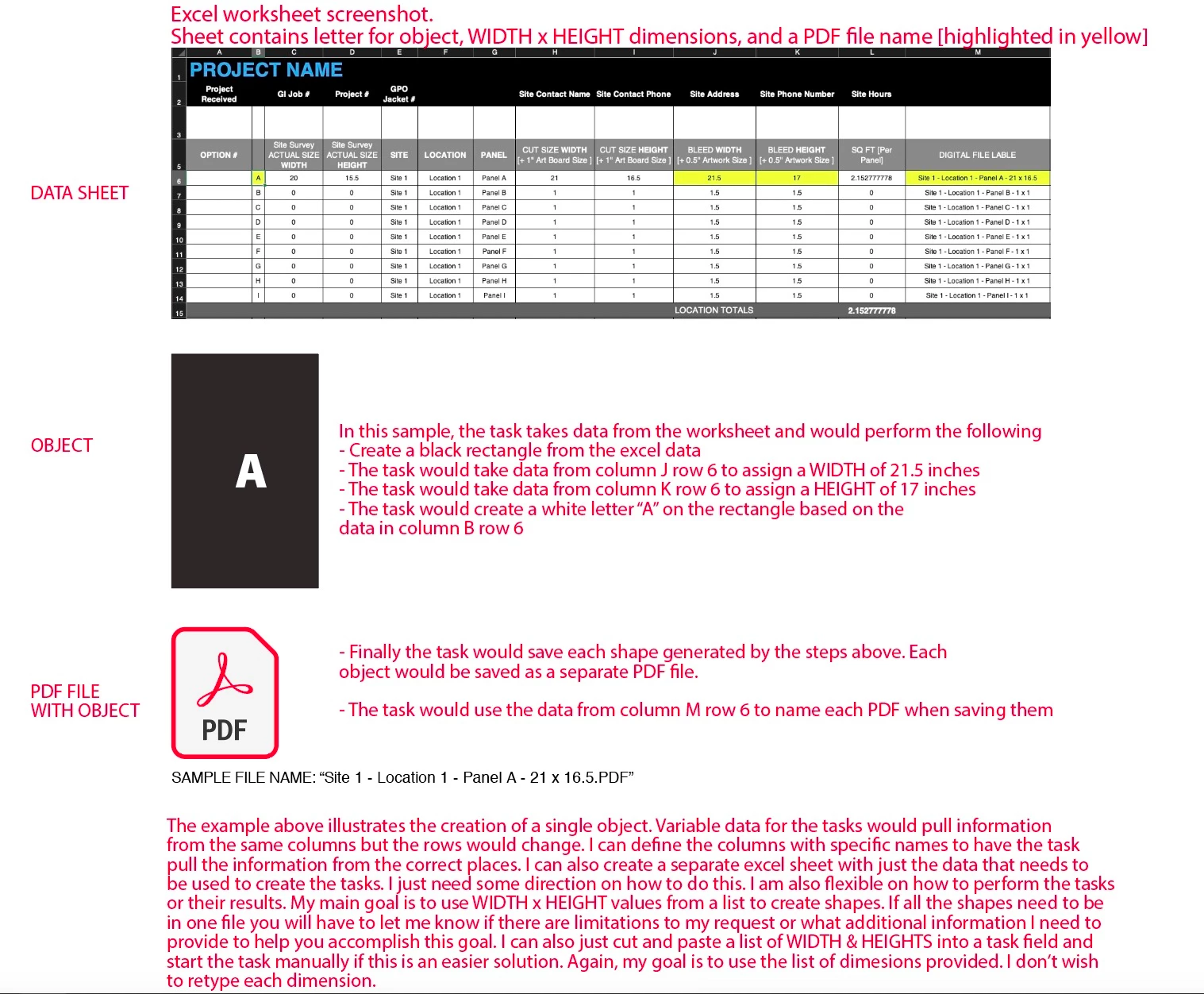
Can anyone tell me if there is a way to generate multiple shapes simultaneously using WIDTH x HEIGHT from a CSV worksheet of dimensions? Similar to the way varaiable data is used in Adobe Illustrator. The attached image describes a more detailed process with letters and saving but I'd like to just find a way to accomplish making the shapes. I basiclly have a list of W x H dimensions and need way to generate a lot of boxes with a single task. I only need to process around 10 shapes at a time but I need to do about 5K shapes all with different dimensions. Entering every value manually will take forever and I was hoping to automate this task. 


This topic has been closed for replies.
Correct answer CarlosCanto

...added Letters to sillyV's script
function test () {
	var COL_NAME = 0;
	var COL_WIDTH = 1;
	var COL_HEIGHT = 2;
    var COL_CHAR = 3;
    
	var OUTPUT_DIR = "~/Desktop/Ai Forums Test 08212020";
    Folder(OUTPUT_DIR).create();
    
	var csvFile = File.openDialog("Choose CSV file.", "*.csv");
	var csvContents = "";
	if (csvFile) {
		csvFile.open('r');
		csvContents = csvFile.read();
		csvFile.close();
	}
	var csvData = csvContents.split(/[\r\n]+/g);
	var thisRow;
	for (var i = 0; i < csvData.length; i++) {
		thisRow = csvData[i];
		csvData[i] = thisRow.split(",");
	}
	var workDoc = app.documents.add();
	var thisRecord, w, h, name, newRect, c;
	var opts = new PDFSaveOptions();
    
    var tframe = workDoc.textFrames.add();

	for (var i = 1; i < csvData.length; i++) {
		thisRecord = csvData[i];
		name = thisRecord[COL_NAME];
		w = thisRecord[COL_WIDTH] * 72;
		h = thisRecord[COL_HEIGHT] * 72;
         c = thisRecord[COL_CHAR];
         
		newRect = workDoc.pathItems.rectangle(0, 0, w, h);
         newRect.move(tframe, ElementPlacement.PLACEAFTER);
		newRect.selected = true;
		workDoc.fitArtboardToSelectedArt(0);
		newRect.stroked = false;
        
         tframe.contents = c;
         tframe.textRange.characterAttributes.size = 48;
         tframe.textRange.characterAttributes.fillColor = workDoc.swatches.getByName("White").color;
         tframe.position = [newRect.left + newRect.width/2 - tframe.width/2, newRect.top - newRect.height/2 + tframe.height/2];
         
		newRect.fillColor = workDoc.swatches.getByName("Black").color;
		workDoc.saveAs(File(OUTPUT_DIR + "/" + name + ".pdf"), opts);
		workDoc.pathItems[0].remove();
	}
	workDoc.close(SaveOptions.DONOTSAVECHANGES);
};
test();


 

3 replies

CarlosCanto
Community Expert
CarlosCantoCommunity ExpertCorrect answer
Community Expert
August 22, 2020

...added Letters to sillyV's script

function test () {
	var COL_NAME = 0;
	var COL_WIDTH = 1;
	var COL_HEIGHT = 2;
    var COL_CHAR = 3;
    
	var OUTPUT_DIR = "~/Desktop/Ai Forums Test 08212020";
    Folder(OUTPUT_DIR).create();
    
	var csvFile = File.openDialog("Choose CSV file.", "*.csv");
	var csvContents = "";
	if (csvFile) {
		csvFile.open('r');
		csvContents = csvFile.read();
		csvFile.close();
	}
	var csvData = csvContents.split(/[\r\n]+/g);
	var thisRow;
	for (var i = 0; i < csvData.length; i++) {
		thisRow = csvData[i];
		csvData[i] = thisRow.split(",");
	}
	var workDoc = app.documents.add();
	var thisRecord, w, h, name, newRect, c;
	var opts = new PDFSaveOptions();
    
    var tframe = workDoc.textFrames.add();

	for (var i = 1; i < csvData.length; i++) {
		thisRecord = csvData[i];
		name = thisRecord[COL_NAME];
		w = thisRecord[COL_WIDTH] * 72;
		h = thisRecord[COL_HEIGHT] * 72;
         c = thisRecord[COL_CHAR];
         
		newRect = workDoc.pathItems.rectangle(0, 0, w, h);
         newRect.move(tframe, ElementPlacement.PLACEAFTER);
		newRect.selected = true;
		workDoc.fitArtboardToSelectedArt(0);
		newRect.stroked = false;
        
         tframe.contents = c;
         tframe.textRange.characterAttributes.size = 48;
         tframe.textRange.characterAttributes.fillColor = workDoc.swatches.getByName("White").color;
         tframe.position = [newRect.left + newRect.width/2 - tframe.width/2, newRect.top - newRect.height/2 + tframe.height/2];
         
		newRect.fillColor = workDoc.swatches.getByName("Black").color;
		workDoc.saveAs(File(OUTPUT_DIR + "/" + name + ".pdf"), opts);
		workDoc.pathItems[0].remove();
	}
	workDoc.close(SaveOptions.DONOTSAVECHANGES);
};
test();

 

Inspiring
August 24, 2020

Thanks so much Carlos. I took a look at the code to help me understand how you inserted the page numbering. I was able to increase the type size.

Silly-V
Legend
August 21, 2020

Here is a simple example which you or someone else could edit or use as starting point.


#target illustrator
function test () {
	var COL_NAME = 0;
	var COL_WIDTH = 1;
	var COL_HEIGHT = 2;
	var OUTPUT_DIR = "~/Desktop/Ai Forums Test 08212020";
	var csvFile = File.openDialog("Choose CSV file.", "*.csv");
	var csvContents = "";
	if (csvFile) {
		csvFile.open('r');
		csvContents = csvFile.read();
		csvFile.close();
	} else {
                return;
        }
	var csvData = csvContents.split(/[\r\n]+/g);
	var thisRow;
	for (var i = 0; i < csvData.length; i++) {
		thisRow = csvData[i];
		csvData[i] = thisRow.split(",");
	}
	var workDoc = app.documents.add();
	var thisRecord, w, h, name, newRect;
	var opts = new PDFSaveOptions();
	for (var i = 1; i < csvData.length; i++) {
		thisRecord = csvData[i];
		name = thisRecord[COL_NAME];
		w = thisRecord[COL_WIDTH] * 72;
		h = thisRecord[COL_HEIGHT] * 72;
		newRect = workDoc.pathItems.rectangle(0, 0, w, h);
		newRect.selected = true;
		workDoc.fitArtboardToSelectedArt(0);
		newRect.stroked = false;
		newRect.fillColor = workDoc.swatches.getByName("Black").color;
		workDoc.saveAs(File(OUTPUT_DIR + "/" + name + ".pdf"), opts);
		workDoc.pathItems[0].remove();
	}
	workDoc.close(SaveOptions.DONOTSAVECHANGES);
};
test();
 

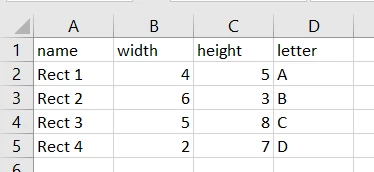
It uses the following data csv:

And it makes the following pdfs:


Inspiring
August 21, 2020

Thanks Silly-V

This look amazing... I see you even converted it from inches to pixels which is great. I actually did that on my excel sheet but if the script does that, even better. Can I just use the script in my script editor and save it to test or do I need to modify it? Should I take out any parts to make it save? I tried just saving it and it said "Expected end of line, etc. but found identifier."


This simple thing you did is still over my head. I tried testing it in shellcheck.net but it was telling me to "Add a Shebang or 'shell' Directive"


Silly-V
Legend
August 21, 2020

If you can copy the text into notepad and save as .jsx, you can go from Illustrator File > Scripts > Other Scripts and choose this .jsx file wherever you saved it. Then it should run. I just tried to do this and it worked for me.
You should also be able to run it from the old ESTK or the VSCode Adobe plugin just fine.

CarlosCanto
Community Expert
Community Expert
August 21, 2020

I don't think you can generate a rectangle with specific WxH using Variable Data. But you can using Scripting. If you know how to program and want to write a script yourself, I can point you where to download the documentation.

Inspiring
August 21, 2020

Thx Carlos

I don't know how to script. I've spent a lifetime creating artwork in Adobe's GUI world so all my experience is pretty surface visuals. I'm handy enough to come up with workarounds and smart/dangerous enough not to try too often. This is something that is over my head.


If you can point me in any direction it would be greatly appreciated. Not sure what to search to find a solution and Frankenstein something simple for myself.


I've tried:

  • Asking in forums like AutoCAD and print production software from ESKO.com.
  • Tried macros in Excel 
  • Searched for a solution in Javascript
  • Searched for a similar solution on a stock site like codecanyon.net to see if someone was doing a similar task I could purchase. 


I even stalked you read your posts and found your script for doing page numbering in illustrator [PS can I exchange numbers for letters] to incorporate into this project.


I found a simple code for building SVG shapes online [see code below] from w3schools.com but don't understand how to build an interface to easily cut and paste the W x H data to generate the boxes.


I've found bits and pieces but I don't know what to search to get the results. Surprised I'm the only one who needs to do something like this.


<html>
<body>

<svg width="20" height="50">
<rect width="20" height="30" style="fill:cmyk(0,0,0,0)" />
Sorry, your browser does not support inline SVG.
</svg>

<svg width="20" height="50">
<rect width="20" height="30" style="fill:cmyk(0,0,0,0)" />
Sorry, your browser does not support inline SVG.
</svg>

<svg width="20" height="50">
<rect width="20" height="30" style="fill:cmyk(0,0,0,0)" />
Sorry, your browser does not support inline SVG.
</svg>

</body>
</html>
