


Participant
March 8, 2025
Answered

Need help to creating these letters shown
  • March 8, 2025
  • 2 replies
  • 312 views

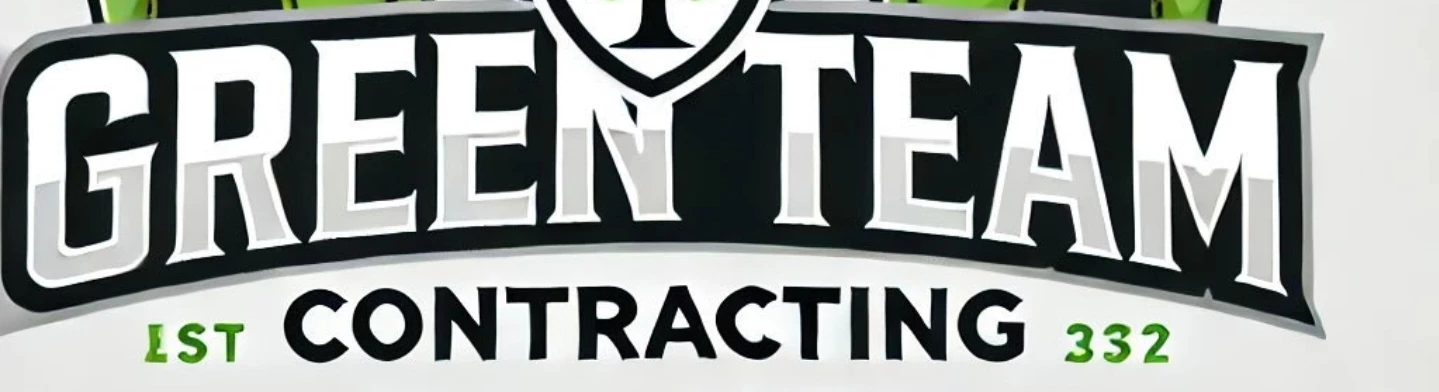
 Im trying to create the "GREEN TEAM" lettering as shown in this image. I'm still learning all of the tools in Illustrator, but I'm not sure what to call this to search for tutorials in the help section. 


Here is what I know and need help with:

  • I know how to create the arc of the letters in a couple ways. Envelope Distort with warp or type on a path. 
  • How do I create the outline around the letters? The contoured black around it?

I'd appreciate any assistance! 

Correct answer Monika Gause

The contoured black: as Bobby already wrote: Offset path.

But then you need to draw it, because otherwise it would look ugly. So just use the left and the right part of those offset letters and then draw two arcs (top and bottom) to get clean adges. And combine those using any kind of editing you feel comfortable with.


You might want to get acquainted with editing paths by cutting them, grouping and ungrouping, reading the layers panel so you know what kind of object you have, compound paths and releasing them, Pathfinder panel. Live paint.

2 replies

Monika Gause
Community Expert
Monika GauseCommunity ExpertCorrect answer
Community Expert
March 8, 2025

The contoured black: as Bobby already wrote: Offset path.

But then you need to draw it, because otherwise it would look ugly. So just use the left and the right part of those offset letters and then draw two arcs (top and bottom) to get clean adges. And combine those using any kind of editing you feel comfortable with.


You might want to get acquainted with editing paths by cutting them, grouping and ungrouping, reading the layers panel so you know what kind of object you have, compound paths and releasing them, Pathfinder panel. Live paint.

Participant
March 8, 2025

Thank you for this info. I will try to use these tools and create it. 

Community Expert
March 8, 2025

I usually create those kinds of letter outline effects using the Offset Path command and applying it to copies of the letters. Positive numerical values go outside the path, negative numbers go inside the path.

Participant
March 8, 2025

Thank you! I was wondering if that would be part of the solution.