


Participant
March 15, 2023
Answered

Need help with Actions panel

  • March 15, 2023
  • 2 replies
  • 758 views

Hello,


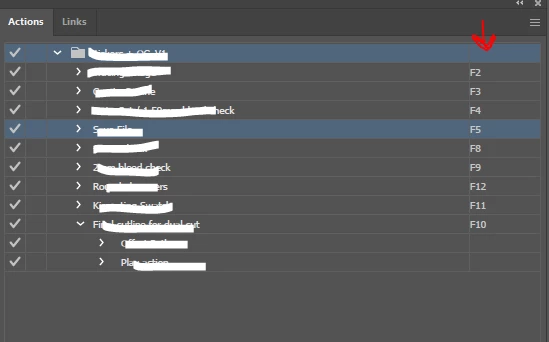
Can someone please help me with how we can enable/disable the shortcut key numbers reflecting on the side?

Some of the useres did'nt get the detail of what shortcut key has been set, so if there is any way to enable showing the shortcut key on the side would be much helpful.


Thanks
 

This topic has been closed for replies.
Correct answer Kurt Gold

In older versions of Illustrator you may turn on the button mode (see Actions palette flyout menu) to quickly detect assigned keyboard shortcuts.


2 replies

Kurt Gold
Community Expert
Kurt GoldCommunity ExpertCorrect answer
Community Expert
March 16, 2023

In older versions of Illustrator you may turn on the button mode (see Actions palette flyout menu) to quickly detect assigned keyboard shortcuts.


CarlosCanto
Community Expert
Community Expert
March 16, 2023

I used to include the shortcut key as part of the Action's name. I couldn't remember the rarely used Actions I had.

CarlosCanto
Community Expert
Community Expert
March 15, 2023

if the Action has a shortcut assigned it will show up on the right side, otherwise it will look empty.

Participant
March 16, 2023

Thanks for the suggestion @CarlosCanto 

Have just checked the same, sortcut is assigned but still not showing up on right side.

CarlosCanto
Community Expert
Community Expert
March 16, 2023

I see, check the other users versions, it seems to be new to the latest version, shortcuts are not showing on CC2022.