Known Participant
November 26, 2025
Answered

Need help with script to export DXF with specific settings

  • November 26, 2025
  • 1 reply
  • 496 views

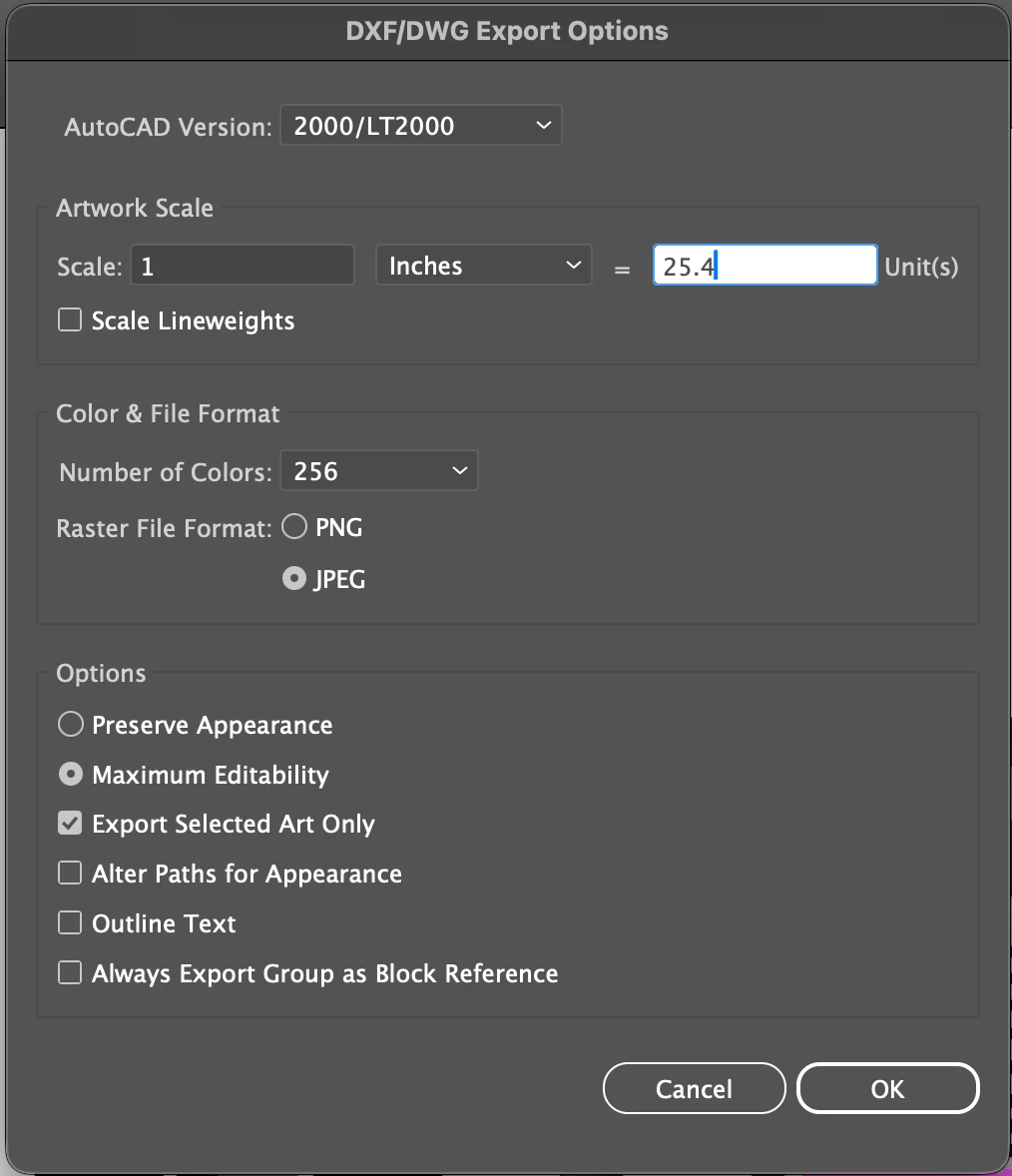
I'm not able to find much on google. I have an image with the settings below. As for file name and file locations, the file name is already saved and the file pathway is already established. If the script can just keep the same file name and location, that would be amazing.

Thanks so much in advance!


Correct answer jduncan

I don't have any experience with AutoCAD DXF files but here's a script based on the API docs. Try it out and let me know if it works? Cheers!


(function () {
    //@target illustrator

    // No need to continue if there is no active document.
    if (!app.documents.length) {
        alert("No active document.");
        return;
    }

    // Get the current document and it's path (if saved).
    var doc = app.activeDocument;
    var docFolder = doc.path == "" ? Folder.desktop : new Folder(doc.path);

    // Strip off any extensions from the document name and change the spaces to hyphens.
    var exportName = doc.name.replace(/\.pdf|\.ai|\.eps$/i, "");

    // Set export files.
    var exportFile = new File(docFolder + "/" + exportName);

    // Set DXF/DWG Export Options.
    var opts = new ExportOptionsAutoCAD();
    // see docs https://ai-scripting.docsforadobe.dev/jsobjref/ExportOptionsAutoCAD/

    // VERSION
    opts.version = AutoCADCompatibility.AutoCADRelease24;
    // not sure which version equals 2000/LT2000 for more info
    // see docs https://ai-scripting.docsforadobe.dev/jsobjref/scripting-constants/#autocadcompatibility

    // ARTWORK SCALE
    opts.unit = AutoCADUnit.Inches;
    opts.unitScaleRatio = 25.4;
    opts.scaleLineweights = false;

    // COLOR & FILE FORMAT
    opts.colors = AutoCADColors.Max256Colors;
    opts.rasterFormat = AutoCADRasterFormat.JPEG;
    opts.exportFileFormat = AutoCADExportFileFormat.DXF;

    // OPTIONS
    opts.exportOption.PreserveAppearance = false;
    opts.exportOption.MaximizeEditability = true;
    opts.exportSelectedArtOnly = true;
    opts.alterPathsForAppearance = false;
    opts.convertTextToOutlines = false;

    // Set export type.
    var type = ExportType.AUTOCAD;

    // Export DXF file. docs:https://ai-scripting.docsforadobe.dev/jsobjref/Document/?h=exportfile#documentexportfile
    doc.exportFile(exportFile, type, opts);
})();

https://ai-scripting.docsforadobe.dev/jsobjref/ExportOptionsAutoCAD/  

1 reply

jduncan
Community Expert
jduncanCommunity ExpertCorrect answer
Community Expert
November 26, 2025

I don't have any experience with AutoCAD DXF files but here's a script based on the API docs. Try it out and let me know if it works? Cheers!


(function () {
    //@target illustrator

    // No need to continue if there is no active document.
    if (!app.documents.length) {
        alert("No active document.");
        return;
    }

    // Get the current document and it's path (if saved).
    var doc = app.activeDocument;
    var docFolder = doc.path == "" ? Folder.desktop : new Folder(doc.path);

    // Strip off any extensions from the document name and change the spaces to hyphens.
    var exportName = doc.name.replace(/\.pdf|\.ai|\.eps$/i, "");

    // Set export files.
    var exportFile = new File(docFolder + "/" + exportName);

    // Set DXF/DWG Export Options.
    var opts = new ExportOptionsAutoCAD();
    // see docs https://ai-scripting.docsforadobe.dev/jsobjref/ExportOptionsAutoCAD/

    // VERSION
    opts.version = AutoCADCompatibility.AutoCADRelease24;
    // not sure which version equals 2000/LT2000 for more info
    // see docs https://ai-scripting.docsforadobe.dev/jsobjref/scripting-constants/#autocadcompatibility

    // ARTWORK SCALE
    opts.unit = AutoCADUnit.Inches;
    opts.unitScaleRatio = 25.4;
    opts.scaleLineweights = false;

    // COLOR & FILE FORMAT
    opts.colors = AutoCADColors.Max256Colors;
    opts.rasterFormat = AutoCADRasterFormat.JPEG;
    opts.exportFileFormat = AutoCADExportFileFormat.DXF;

    // OPTIONS
    opts.exportOption.PreserveAppearance = false;
    opts.exportOption.MaximizeEditability = true;
    opts.exportSelectedArtOnly = true;
    opts.alterPathsForAppearance = false;
    opts.convertTextToOutlines = false;

    // Set export type.
    var type = ExportType.AUTOCAD;

    // Export DXF file. docs:https://ai-scripting.docsforadobe.dev/jsobjref/Document/?h=exportfile#documentexportfile
    doc.exportFile(exportFile, type, opts);
})();

https://ai-scripting.docsforadobe.dev/jsobjref/ExportOptionsAutoCAD/  

paloma95Author
Known Participant
November 26, 2025

Thank you, it's so close!! Something is off with the artwork scale. The exported DXF turns out to be very huge. I'm not sure how it looks in a script language, but the correct ratio should be 1 inch = 25.4 units.

jduncan
Community Expert
Community Expert
November 27, 2025

Sorry, I had a typo (units instead of unit). I have edited the original script above with the correct version.