Participant
February 17, 2022
Question

Need solution for Auto Italic

  • February 17, 2022
  • 2 replies
  • 166 views

Hi,

I am using a font (Symbol) for making a graph in illustrator. Sometime the font looks like italic without italic  family and without shear sometime it looks regular. Is there any hidden setting for this please suggest.
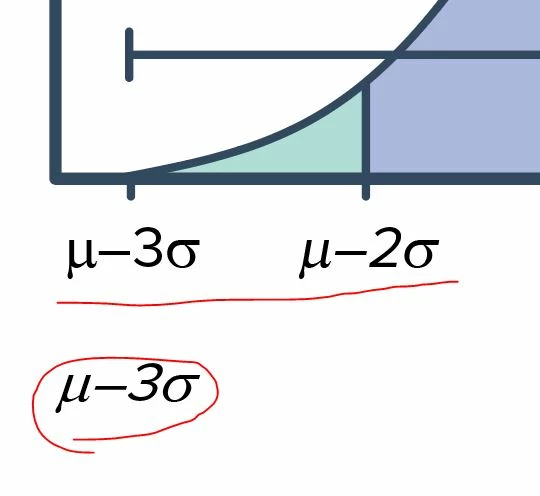
Here is a screen shot for refferance.


Thanks,

Wilson

This topic has been closed for replies.

2 replies

kphotopage
Legend
February 17, 2022

I agree with Mylenium, look in your Appearance Panel.


Here, I’m working with live text, Symbol font.

For the Cyan one, I could recreate a similar look of shear/italics.


I did that by switching to the Selection Tool, Added a new Fill of cyan and then Effect>Distort>Free Distort.


K

kphotopage
Legend
February 17, 2022

Another place to check is in your Layer Panel and again in your Appearance Panel.

Look for a colored meatball. That is a signal something has been assigned to that Path, Group or Layer.


K

What does your text look like in View>Preview vs View>Outline???


Mylenium
Legend
February 17, 2022

Start by checking your glyph substitution options in the text panels. Also check for text styles being applied and other stuff in the appearance palette.


Mylenium