

j.khakase
Inspiring
February 20, 2024
Answered

Need to apply Gradient on individual icons not over all icons using Appearance panel

  • February 20, 2024
  • 1 reply
  • 506 views

Hello Friends,

Need help on to apply gradient through appearence panel to apply look on multiple icons.

Gradient in the top square is the part of company logo and I want to apply same gradient on all icons. for that I create a blank layer and selecting it apply gradient the Appereance panel to Layer while nothing is selected. Now while moving icons from working layers to targeted layer where I applied gradient the gradient not applying on each object its counting to whole layer. How to solve this issue? 
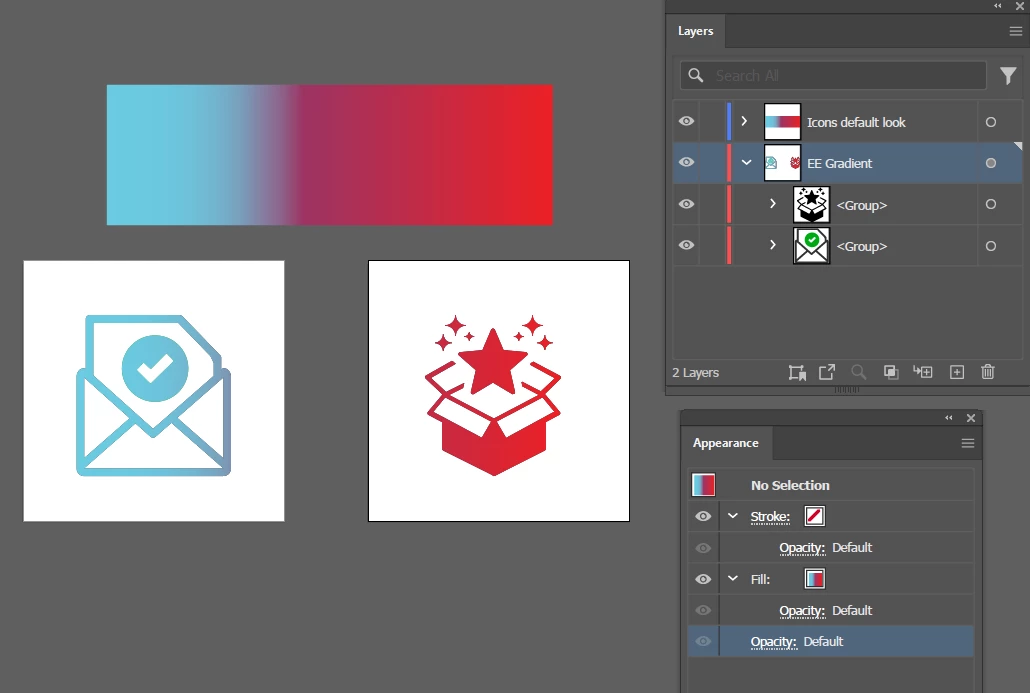
 

Expecting Result like below image:

 

This topic has been closed for replies.
Correct answer Monika Gause

To solve this:

either do not apply the gradient to the layer (but instead make a group of each icon and apply it to the group)

Or put each icon on its own layer

1 reply

Monika Gause
Community Expert
Monika GauseCommunity ExpertCorrect answer
Community Expert
February 20, 2024

To solve this:

either do not apply the gradient to the layer (but instead make a group of each icon and apply it to the group)

Or put each icon on its own layer

j.khakase
j.khakaseAuthor
Inspiring
February 20, 2024

While appling style through group, when I moved back to default postion at normal layer the applied styled its still remain it doesn't normalize automatically is there any other solution. but thank you for your reply. at least I got solution on this

Monika Gause
Community Expert
Community Expert
February 20, 2024

I'm sorry I don't understand.

Please show screenshots.