


Participant
Aug 9, 2024 1:21 PM UTC
Question

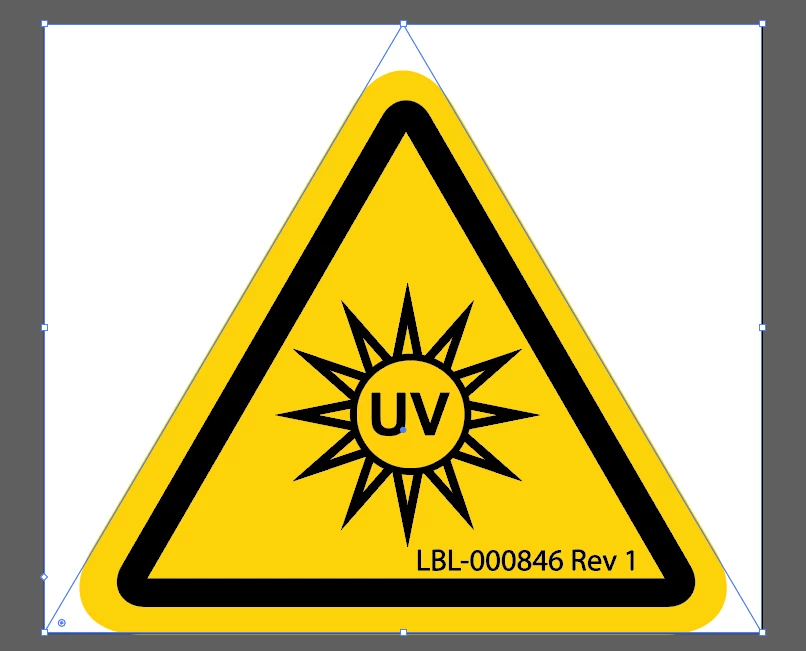
Need triangle outline (dims) vs bounding box to spec out label stock

I have created a safety label in Illustrator that needs to be printed in house on a label machine. I need to determine the exact dimentions on the shape to determine a die cut label size to feed stock through the printer. The shape must remain triangular with no white border. How to I determine size of actual triangle shape not the bounding box?  Can I make a triangular artboard? Not sure what to do any help is appreciated. Thank you!
 

This topic is closed to new replies. Start a new post to keep the conversation going.

3 replies

Jacob Bugge
Community Expert
Community Expert
Aug 9, 2024 6:50 PM UTC

JOD-TW,


Unless the label stock is transparent rather than white, you will need the label machine to cut along the outer yellow boundary with its rounded corners as a die cut path as mentioned by Monika. Is that within the capability of the in house label machine?


If the label stock is transparent, you can optimize by using the Preview Bounds as mentioned by Ton.


A further description of the stock and the way the label machine works may help helpers.


Translate
Monika Gause
Community Expert
Community Expert
Aug 9, 2024 3:13 PM UTC

Do you need a cut contour?

Translate
Ton Frederiks
Community Expert
Community Expert
Aug 9, 2024 1:37 PM UTC

Use Preview Bounds from Preferences?

Translate