
Participant
August 7, 2024
Answered

network error when logging into Pantone Connect

  • August 7, 2024
  • 2 replies
  • 1106 views

When trying to log-in to Pantone Connect today, I'm getting a network error message on the log-in page.

I use an e-mail and password to log-in.

I've tried closing Illustrator and rebooting my PC, but nothing works!!

Can anyone help please
This topic has been closed for replies.
Correct answer Rene Andritsch

As Pantone Connect is not an Adobe product you maybe have to wait until they sort out their problems or check if you have network problems at your end.

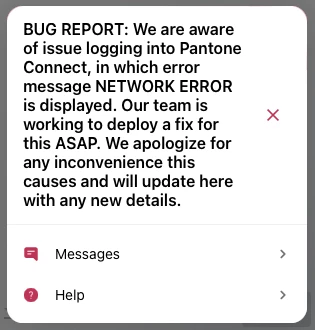
I just tried to login to theri website and it is a problem on their end as stated in the screenshot. You have to wait.


2 replies

Participant
December 18, 2024

Same problem whether using Chrome or the app...went in and deleted Browser History, Cookies and Site Data, and Cached Images ( may have only needed Cookies) and problem fixed.

Rene Andritsch
Community Expert
Rene AndritschCommunity ExpertCorrect answer
Community Expert
August 7, 2024

As Pantone Connect is not an Adobe product you maybe have to wait until they sort out their problems or check if you have network problems at your end.

I just tried to login to theri website and it is a problem on their end as stated in the screenshot. You have to wait.


Participant
August 7, 2024

Hi Rene

Thank you so much for your reply and BUG REPORT screen shot!!

At least I know it's not me being stupid!!