
Participant
October 18, 2024
Question

New Document Window - Is it refreshing on me?

  • October 18, 2024
  • 2 replies
  • 361 views

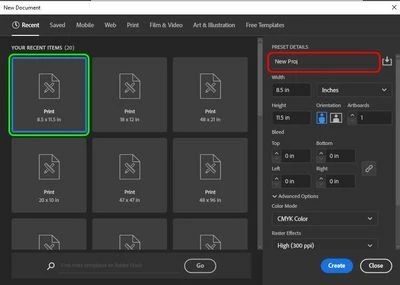
Hello! When I create a new document in Illustrator, I immediately name it for the project I'm working on (red box, uploaded image). As I'm typing, the active field reverts back to the most recent item under "your recent items" (green box) and I have to click or tab back over to the name field again. Typically it's been happening once, then I can finish setting the info and create the new doc. This happened twice now with the most recent document I'm creating. It was occuring with illustrator 2024 and is now continuing with the newest update 2025. I've reinstalled, rebooted, all the basics.
This topic has been closed for replies.

2 replies

Participant
November 20, 2024

Same issue, and the response from Anubhav doesn't seem to understand the problem.


With the New Document window open, changing the document size and bleed by tabbing between fields, the window sometimes randomly resets to the most recent "Your recent items". (Cristy5EB2 has highlighted this in green in their pic.)

For me, this is almost always while entering the bleed. 


Unlike Cristy5EB2, I do not usually change the file name in this window (I usually leave it "Untitled-#").


Very annoying to create the file, then find that it's the wrong size because illustrator decided halfway through your input that it knows best.

Is the Document preset loading a few seconds after the window appears, thus erasing any changes you've made? 

Anshul_Saini
Community Manager
Community Manager
November 25, 2024

Hello @Noadobstopbeingcrummy,


Thank you for bringing this to our attention. I’ve tried replicating this issue using different presets, but I couldn’t replicate the behavior where the new document window reverts changes mid-input.


To troubleshoot further:

1. Sometimes, resetting preferences resolves such interface glitches. Please back up your current preferences first, as this process resets all your settings to default.

2. If resetting preferences doesn’t resolve the issue:

• Share your system specs (OS version, processor, RAM, etc.) and your Illustrator version.

• Provide a screen recording showing the exact behavior.


This additional information will help us forward the details to the product team for investigation.


Looking forward to hearing back from you!


Best regards,

Anshul Saini

Anubhav M
Community Manager
Community Manager
October 18, 2024

Hi @Cristy5EB2,

Thank you for reaching out! Starting with Illustrator 28.7.1, you can now save your new document settings as a Preset, which is why it appears refreshed. You can learn more about it here: (https://helpx.adobe.com/illustrator/using/create-documents.html#create-and-save-custom-document-presets).

If you have any other questions or need further assistance, feel free to reach out. We're always here to help!


Anubhav