Participant
October 28, 2020
Answered

New pattern swatch changing when I use it as a fill?

  • October 28, 2020
  • 1 reply
  • 496 views

Hi, I'm trying to fill a lettered vector with a new pattern swatch I made. 


The lines of the pattern are very thinly spaced apart, but when I use the new swatch to fill in my vector, the lines become further spaced apart and dont look at all like the pattern I initially created.


How can I make it so the pattern swatch doesnt change when I use it to fill a new object? 


Thanks
 

This topic has been closed for replies.
Correct answer barbara_a7746676

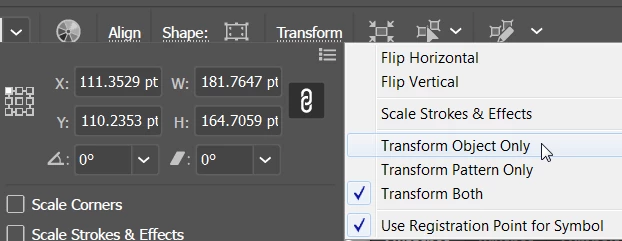
If you enlarged the letters after filling with the pattern, the pattern may have enlarged as well. You can control that in the Transform panel.

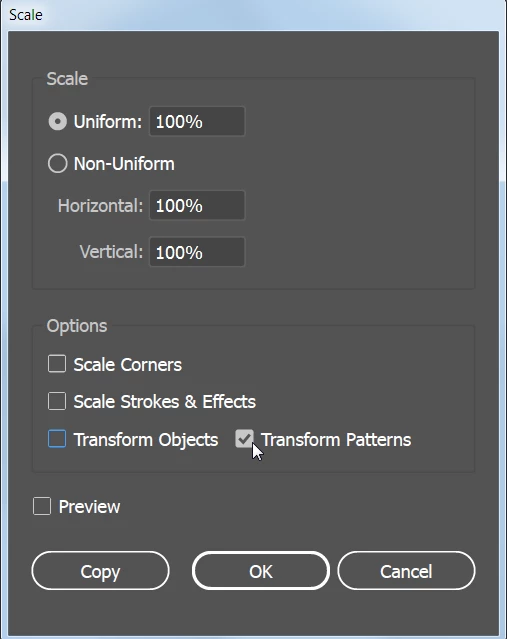
You can scale the pattern separately from the letters. Select the letters. If the letters have more than one fill, select the pattern fill in the Appearance panel. Then double-click on the Scale tool in the Tools panel and scale only the pattern.


1 reply

Ton Frederiks
Community Expert
Community Expert
October 28, 2020

Please show something.

Participant
October 30, 2020

Hi! The pattern swatch is on the right and you can see on the left, when I use it as a fill on the lettering, the space between the lines become bigger and thicker. 

barbara_a7746676
Community Expert
barbara_a7746676Community ExpertCorrect answer
Community Expert
October 30, 2020

If you enlarged the letters after filling with the pattern, the pattern may have enlarged as well. You can control that in the Transform panel.

You can scale the pattern separately from the letters. Select the letters. If the letters have more than one fill, select the pattern fill in the Appearance panel. Then double-click on the Scale tool in the Tools panel and scale only the pattern.