
ishanap20781753
Participant
May 12, 2019
Answered

Newly created pattern does not appear in the swatch panel in any other file than its own

  • May 12, 2019
  • 4 replies
  • 18769 views

Hi! I'm new to illustrator and I can't seem to find an answer in any of the of the forums.

Here's how it is: I created a pattern (Object > Pattern > Make) successfully saved as pattern to swatch panel. Great.

Except, when I open up a new file to practice using the pattern, it's not in the swatch panel. I checked the settings and it said it was showing everything.

I go back to the original file that I used to make the pattern. According to the swatch panel, it is a pattern. Going from each file and the contents of the swatch panel changes. I can't figure out how to keep the pattern there. What's the point of creating a pattern if I can't put it on anything else.

If anyone has encountered this before, please help me.
Correct answer Anna Lander

The Swatches panel is associated to your working file. If you close the file withour saving, you will loose the new swatches. So, to see the new pattern somewhere else, you have to save the swatches set.

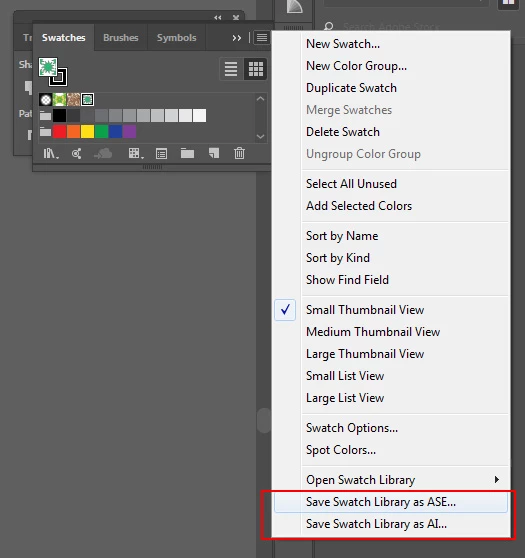
Use Panel menu > Save Swatches Library as ASE (support file, Adobe Swatches) / Save Swatches Library as AI (Adobe Illustrator file).

then you can add your pattern to any other artwork using Open Swatch Library option.

4 replies

Participant
January 5, 2024

Make sure you seleck " Show All Swatches " .

Monika Gause
Community Expert
Community Expert
January 5, 2024

This will only help if the pattern is in the file. The problem is that the pattern isn't in the file.

Participant
October 26, 2023

Save it as an AI Library and it works. Not going to use patterns in the other apps so no point in using the ASE Library.

diamondw82926617
Participant
August 11, 2019

I have the opposite problem! I can see the swatches but not the original file, what do I do?

Anna Lander
Inspiring
August 11, 2019

show please how it looks

Anna Lander
Anna LanderCorrect answer
Inspiring
May 12, 2019

The Swatches panel is associated to your working file. If you close the file withour saving, you will loose the new swatches. So, to see the new pattern somewhere else, you have to save the swatches set.

Use Panel menu > Save Swatches Library as ASE (support file, Adobe Swatches) / Save Swatches Library as AI (Adobe Illustrator file).

then you can add your pattern to any other artwork using Open Swatch Library option.

Participant
November 3, 2021

This did not work for me, still cannot find the swatch


Participant
January 19, 2023

me too, even saved files don't show up in new docs as anything useful. A frustrating tool that doesn't seem to work to save time (I might as well redraw the pattern every time)