

Participant
September 6, 2025
Question

next gradient improvement please

  • September 6, 2025
  • 1 reply
  • 83 views

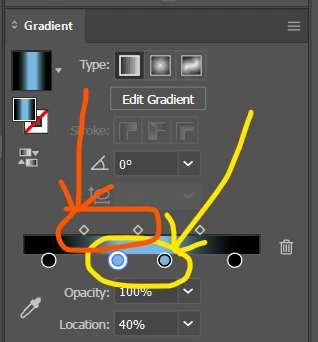
i wish in the next update we could select colors in gradient option and there obesities

1 reply

Monika Gause
Community Expert
Community Expert
September 6, 2025

You mean a popup dialog? Just doubleclick the gradient stop.

mokitAuthor
Participant
November 3, 2025

i mean select 2 colors in the same time

Community Expert
November 3, 2025

I agree it would be nice to be able to select multiple color stops on the gradient annotator at the same time, either to change their colors or move the multiple stops together. That kind of capability is available in Astute Graphics' Gradient Forge plugin.


The biggest change I'd like to see to the Gradient Annotator is having the ability to manually move both ends of the annotator to any desired location. The current setup is needlessly cumbersome to use. The end with the circle icon can move the entire gradient while the other end with the square icon adjusts the length and rotation of the gradient. Please just let us move either end. It's more simple. That's how it works in Affinity Designer and CorelDRAW. It's easier in those applications to build stacks of matching gradients across multiple objects. Unfortunately both of those apps stink at outputting gradients that have varying levels of transparency. Illustrator is better at that.