Participant
August 20, 2019
Answered

No Area Type Tool??

  • August 20, 2019
  • 4 replies
  • 29798 views

Hello,

Just got updated to most recent version of CC (Illustrator v.20.3.4) and  trying to work with Area Type Tool but it appears to be missing? When I select the Type options from the tool bar the below is all I see:
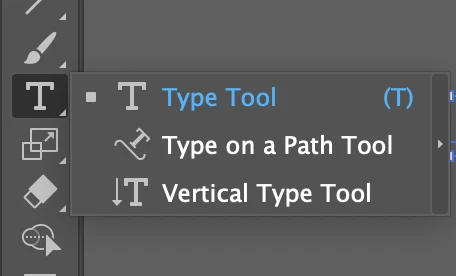
I have never had to change/add configure this menu before. Am I missing something?

Thanks!

    Correct answer CuteVirus

    try change your workspace to Essentials Classic

    4 replies

    CuteVirusCorrect answer
    Participant
    May 30, 2020

    try change your workspace to Essentials Classic

    Participant
    April 16, 2024

    thanks 

    Participating Frequently
    August 20, 2019

    Quick Tip to Create Triangle vs. Using lines and joining

    Select the Polygon tool.

    Click on the Art board and enter the number of sides — for example, type 3 to create a triangle

    Monika Gause
    Community Expert
    Community Expert
    August 20, 2019

    See Steve's answer on how to change the tool bar.

    But actually: nobody needs the area type tool. What do you want to do? It can be done with the type tool.

    Participant
    August 20, 2019

    Hi Thanks for the replies!

    I made a little progress and see the ATT is no longer included in toolbar and that other options exist for filling object paths with text.

    Nevertheless, I tried to make (for example) a simple triangle with the line type tool - grouped the lines to make the object and then tried to to get text to fit inside of object using area type tool/text options in drop down. I was unable to do this for a few reasons, but before I explain full steps maybe someone can give me a few more tips/pointers, etc?

    Also, I was unable to search for the help on this through forum/support/help - unless I simply overlooked.

    I have only used previous versions of Illustrator that had the ATT in the toolbar.

    Thank you!

    Monika Gause
    Community Expert
    Community Expert
    August 20, 2019

    3 lines don't give you a triangle. You need to join those lines.

    Object > Path > Join

    Steve Werner
    Community Expert
    Community Expert
    August 20, 2019

    The tools can be rearranged in recent versions of Illustrator. Click on the ... icon at the bottom of Tools or choose Window > Toolbars

    Participant
    June 7, 2023

    THIS! My tools were defaulted to the 'basic' tools. I had to go into tools and select 'advanced' and WALA! It was there. THANK YOU SO MUCH! You saved me literally hours of tears.