Participant
April 20, 2022
Answered

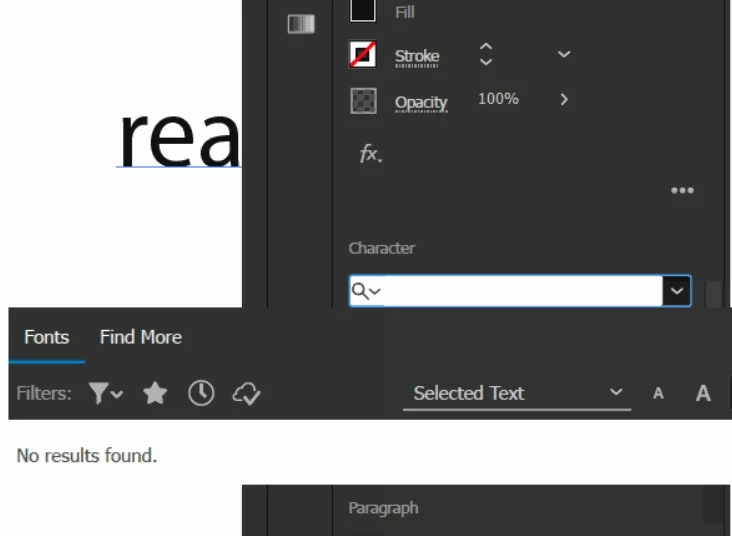
No fonts showing up in illustrator

  • April 20, 2022
  • 3 replies
  • 2002 views

When i open up the font dropdown, there are no results, not even the adobe standard fonts.


My illustrator is up to date, and I have tried resetting preferences, re-installing illustrator, and re-installing fonts (and restarting laptop).


Does anyone know what the problem could be?


This topic has been closed for replies.
Correct answer Anshul_Saini

Thanks for trying the steps. I would suggest you try the following steps one by one and check if it resolves the issue or not:


  1. Manually reset preferences
    - Close all Adobe applications.
    - Go to Location C:\Users\%userprofile%\AppData\Roaming\Adobe
    - Rename Adobe Illustrator and Adobe Illustrator 26 Settings folders to Adobe Illustrator.old and
    Adobe Illustrator - 26 Settings.old
    - Launch Ai from the CC desktop app.
    Disclaimer: Please note that renaming preferences folders will remove all the custom settings, and Illustrator will
    launch with default settings. You can also take a backup of the folders in case you want to. The location is
    mentioned above.
  2. Rename the CEP folder to CEP.old from the following location:
    C:\Program Files (x86)\Common Files\Adobe
  3. If that doesn't help, rename the extensions folder to extensions.old from the following location:
    C:\Program Files\Common Files\Adobe\UXP
  4. If that doesn't help either, uninstall the application using the CC Cleaner tool and reinstall it from the Creative Cloud Desktop app.


We will be looking forward to your response.


Regards,

Anshul Saini


3 replies

Anshul_Saini
Community Manager
Community Manager
April 21, 2022

Hi @plshelpthanks,


Sorry to hear about the trouble. I would request you to please try the steps suggested in the help article:

https://helpx.adobe.com/in/fonts/kb/troubleshoot-fonts-illustrator-indesign.html


Let us know how it goes.


Thanks & Regards,

Anshul Saini

Participant
April 21, 2022

Thank you for your reply.

I've followed the steps, and there is no change to my problem.


Anshul_Saini
Community Manager
Anshul_SainiCommunity ManagerCorrect answer
Community Manager
April 22, 2022

Thanks for trying the steps. I would suggest you try the following steps one by one and check if it resolves the issue or not:


  1. Manually reset preferences
    - Close all Adobe applications.
    - Go to Location C:\Users\%userprofile%\AppData\Roaming\Adobe
    - Rename Adobe Illustrator and Adobe Illustrator 26 Settings folders to Adobe Illustrator.old and
    Adobe Illustrator - 26 Settings.old
    - Launch Ai from the CC desktop app.
    Disclaimer: Please note that renaming preferences folders will remove all the custom settings, and Illustrator will
    launch with default settings. You can also take a backup of the folders in case you want to. The location is
    mentioned above.
  2. Rename the CEP folder to CEP.old from the following location:
    C:\Program Files (x86)\Common Files\Adobe
  3. If that doesn't help, rename the extensions folder to extensions.old from the following location:
    C:\Program Files\Common Files\Adobe\UXP
  4. If that doesn't help either, uninstall the application using the CC Cleaner tool and reinstall it from the Creative Cloud Desktop app.


We will be looking forward to your response.


Regards,

Anshul Saini


Participant
April 20, 2022

Also important to add, fonts do show up in other adobe apps (photoshop, AE, indesign...)

Community Expert
April 20, 2022

Hi,

we need more information to help you. Do you use the latest version of Adobe Illustrator? Which OS are you running the software on? Do you use a font manager?

Participant
April 20, 2022

Yes of course.

I do have the latest version, 26.2.1. I use Windows, and use no font manager.