Participating Frequently
October 1, 2020
Answered

No print document presets in Illy 24.3

  • October 1, 2020
  • 2 replies
  • 695 views

Hi

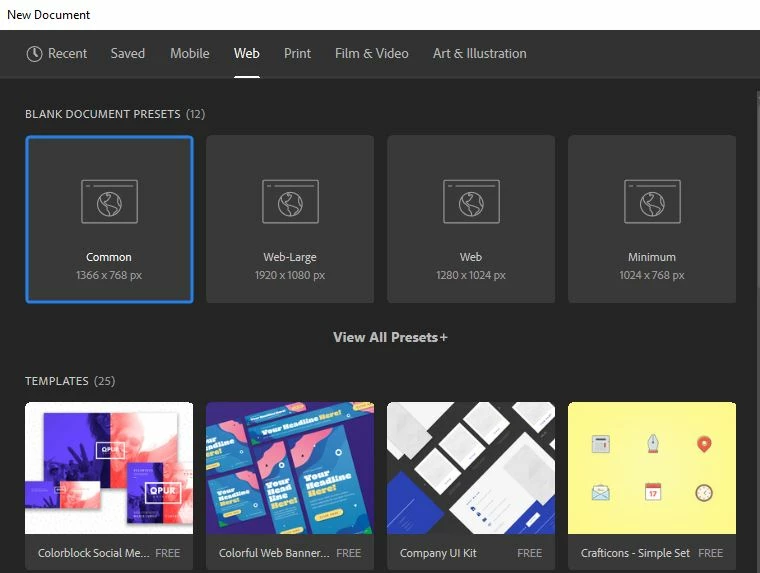
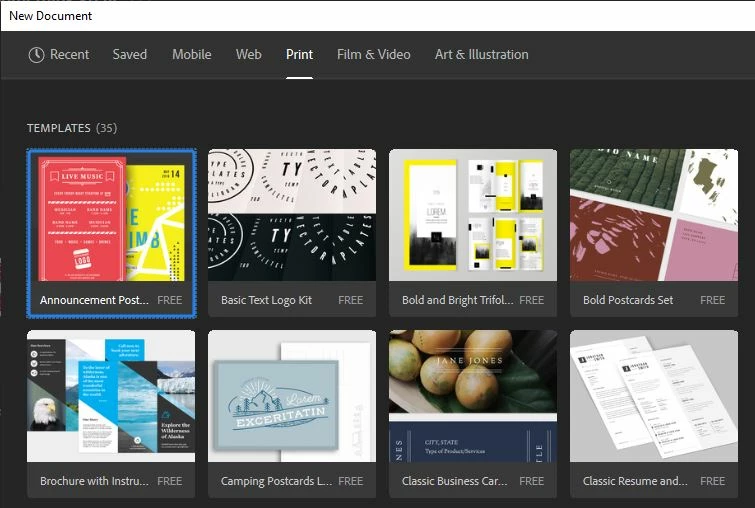
There (seem to be) no new document set-up presets for print in the latest version of Illy - 24.3 Win

(see screenshot attached).

I've reset prefs thinking that might solve it, it did not.

If I use any of the others (which all have presets) I only get rgb swatches.

If I want cmyk set-up I have to use legacy "New File" interface work around.

As I understand it, you can't save bespoke doc set-ups (like you can in Photoshop) so what's the solution, use the old interface in the new version - seems counter intuitive...

Thanks for any help, Raz 
 

This topic has been closed for replies.
Correct answer Doug A Roberts

I don't know what's wrong with the panel here; all I can suggest is reinstalling.

Try this:

Using the old new file interface, create a print document.

Save it to the New Document Presets folder with a different name.

Switch back to the new interface. Does the file appear?

2 replies

October 5, 2020

I'm having the same issue but I don't have any preset from any kind of document. I've tried reinstalling, but it doesn't work. 

Doug A Roberts
Community Expert
Community Expert
October 1, 2020

Do they show up in the old interface?

Can you see the 'Print' doc preset file at C:\Users\Username\AppData\Roaming\Adobe\Adobe Illustrator 24 Settings\en_GB\x64\New Document Profiles ?

RastelloAuthor
Participating Frequently
October 1, 2020

Yes (that's the work around I'm using - and now that I have one doc in the new file dialog and keep using that one)

And yes, I see print.ai in New Doc Profiles folder (it opens as an 8.5x11 with cmyk swatches) but I cannot access this from the New Doc panel.

Doug A Roberts
Community Expert
Doug A RobertsCommunity ExpertCorrect answer
Community Expert
October 1, 2020

I don't know what's wrong with the panel here; all I can suggest is reinstalling.

Try this:

Using the old new file interface, create a print document.

Save it to the New Document Presets folder with a different name.

Switch back to the new interface. Does the file appear?