
Participant
October 11, 2021
Question

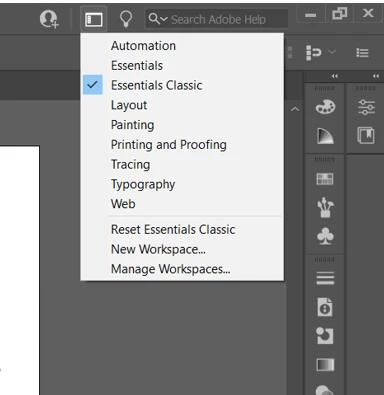
No Touch Workspace when using Wacom One

  • October 11, 2021
  • 1 reply
  • 407 views

Hi,

When I plug in my Wacom One, Illustrator does not give me the "Touch" Workspace option. I've "enabled wacom" in my preferences.  I've also tried every combination of plugging it in before launching illustrator, after launching illustrator, before turning on the computer, after turning on the computer, etc... 

Is there a way to manually enable the "Touch" workspace? 

Thanks!


This topic has been closed for replies.

1 reply

Ashutosh_Mishra
Inspiring
October 31, 2021

Hi there,


Sorry to hear about your experience. Would you mind sharing version of the OS & Adobe Illustrator?

I'd also request you to try the suggestions given on this community post & let us know if they help with your concern.


Regards,

Ashutosh

Participant
April 18, 2022

Hi Ashutosh,

I am using Windows 10 and Illustrator CC.  Because I am not on a mac, the suggested community post was not relevant.

Thanks,

Evon

Anubhav M
Community Manager
Community Manager
April 21, 2022

Hello @evoncassier,


We are really sorry for the experience you are having. This is not the experience we want you to have.


I would request you to please try the steps suggested in these community posts:
https://community.adobe.com/t5/illustrator-discussions/touch-gestures-not-working-in-illustrator-on-windows-system/m-p/11575106

https://community.adobe.com/t5/illustrator-discussions/illustrator-2020-won-t-let-me-use-the-touch-screen-on-windows-10/m-p/10769507


Let us know how it goes. If you need further assistance feel free to reach out. We'd be happy to help.


Thanks,

Anubhav