
No way to grab LAB values using Illustrator script
Hi, I am trying to write javascript code that will run in Illustrator and tell me what the current value of L,A,B of a specific spot swatch I have.
I wrote a more complex script that uses this function, but the problem is with this code snippet:
var c = swatch.color;
    if (c.typename == "SpotColor") {
      c = c.spot.color;
    }
    var colorComponents;
    switch (c.typename) {
      case "RGBColor":
        colorComponents = [c.red, c.green, c.blue];
        break;
      case "CMYKColor":
        colorComponents = [c.cyan, c.magenta, c.yellow, c.black];
        break;
      case "LabColor":
        colorComponents = [c.l, c.a, c.b];
        break;
      case "GrayColor":
        colorComponents = [c.gray];
    }
    var destColorSpace = ImageColorSpace["LAB"];
    var outputColors = app.convertSampleColor(
      sourceSpace,
      colorComponents,
      destColorSpace,
      ColorConvertPurpose.previewpurpose
    );
    var l = outputColors[0], // grabs l value
        a = outputColors[1], // grabs a value
        b = outputColors[2]; // grabs b value
    var color;
Here is more of the code for context:
// edits existing LAB color values
function editSpot(swatch, l, a, b) {
  var spotColor = swatch.color.spot;
  spotColor.color = newLabColor(l, a, b);
  return swatch.color;
}
// creates new LabColor, which gives the color values to the spot
function newLabColor(l, a, b) {
  var newColor = new LabColor();
  newColor.l = l;
  newColor.a = a;
  newColor.b = b;
  return newColor;
}
// creates new spot swatch
function addSpot(name, l, a, b) {
  var newSpot = doc.spots.add();
  newSpot.name = name;
  newSpot.colorType = ColorModel.SPOT;
  newSpot.color = newLabColor(l, a, b);
}
// retrieve swatch by swatch name
function getSwatch(colorName) {
  try {
    var swatchToChange = activeDocument.swatches.getByName(colorName);
  } catch (e) {
    if (placeholder) {
      alert("The swatch name " + colorName + " does not exist.");
    }
    return undefined;
  }
  return swatchToChange;
}
The problem is within the first code snippet. Even though the PDF file is in LAB, and the swatch is in LAB, the variable c gives "RGBColor", which then is being converted to LAB in an unaccurate way.
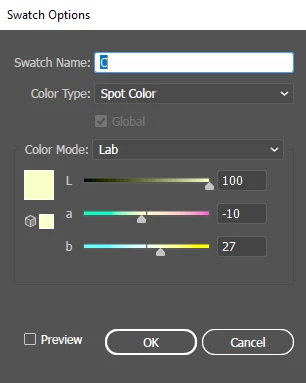
Illustrator only uses integers and doesn't use decimals in color values, e.g. L=70, there isn't an option for L=70.45.
To my surprise though, when I try to preview/alert the value of variable l,a,b (outputColors[0],[1],[2]) - the output will show like this:
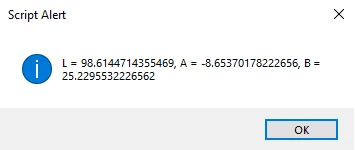
But the swatch colors in illustrator GUI was like this:


 AdChoices