
Participant
Jan 15, 2017 2:49 AM UTC
Answered

[!now] error message whenever I try to export files
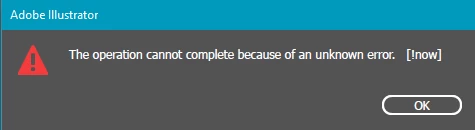
this error message has randomly started happening since i updated illustrator. I have done a clean windows install and it still happens. All I am doing is trying to export designs at 300dpi as a png. I cannot export anything now. And as a work around I have to copy the designs to photoshop and export using that. However I don't like this option as the file is not a vector anymore. I have searched the internet everywhere and can't find anyone with this issue. Please HELP

defaultfrbv4gjl8o35Correct answer
Participating Frequently
Mar 22, 2024 12:05 PM UTC

Had the same issue just now. I'm pretty sure that it was because the output filename was too long; I unchecked the Suffix option and that fixed it.

35 replies

Participant
Oct 15, 2017 12:11 PM UTC

I was having this problem too; I checked "Use Artboards" when exporting and then it worked fine!

Translate
Participant
Sep 14, 2022 2:44 PM UTC

Incredible! Thank you I've been suffering all morning! Perfect fix!!!!


Translate
dgaplansc32017418
Participant
Oct 13, 2017 6:03 PM UTC

Same problem here. Encountered it today.

System/Software Specs:

Illustrator CC 21.1.0 (64-bit)

Windows 7 Professional

Trying to save the file to a network drive

Export method : Export > Export As... > Use Artboards

I am trying to save a large (600in x 72in) image at 300dpi.

Translate
Participant
Sep 29, 2017 1:43 AM UTC

I am having the same exact problem when try to export file in png in 300 dpi. Any soution?

Translate
Monika Gause
Community Expert
Community Expert
Sep 29, 2017 2:33 AM UTC

https://forums.adobe.com/people/r+ra1746432  schrieb

I am having the same exact problem when try to export file in png in 300 dpi. Any soution?

Please answer the questions in #5

Also: how large is the artwork?

Translate
Participant
Jan 2, 2022 10:07 PM UTC

Help #1 for IRS what is available soulution for the Problem

Translate
Participant
Aug 9, 2017 10:00 PM UTC

Got the same probblem, did anyone find a solution?

Translate
Monika Gause
Community Expert
Community Expert
Aug 9, 2017 10:20 PM UTC

https://forums.adobe.com/people/Katja+Trolle+Taksholt  schrieb

Got the same probblem, did anyone find a solution?

Which version of Illustrator?

Which system?

Where are you traing to save the file?

Which export method?

What kind of file are you saving? If it's not a PNG, please create your own thread.

Translate
Participant
Jul 7, 2023 7:33 PM UTC

hello can you help i have the same issue 

im using win11 

i cannot export to any file from AI file 

Translate
Monika Gause
Community Expert
Community Expert
Jan 15, 2017 3:16 AM UTC

Which system is it?

Do you have any third party plugins in Illustrator?

A Wacom?

A printer?

Translate
Participant
Jan 15, 2017 3:49 AM UTC

Hi, I am running Illustrator CC 2017 on windows 10 64 bit and have no third party plugins at all

Translate
jimf24
Participant
Apr 18, 2017 6:09 PM UTC

I get the same error and I am on a Mac with Illustrator CC 2017

Translate