Participant
Jun 30, 2020 7:08 AM UTC
Answered

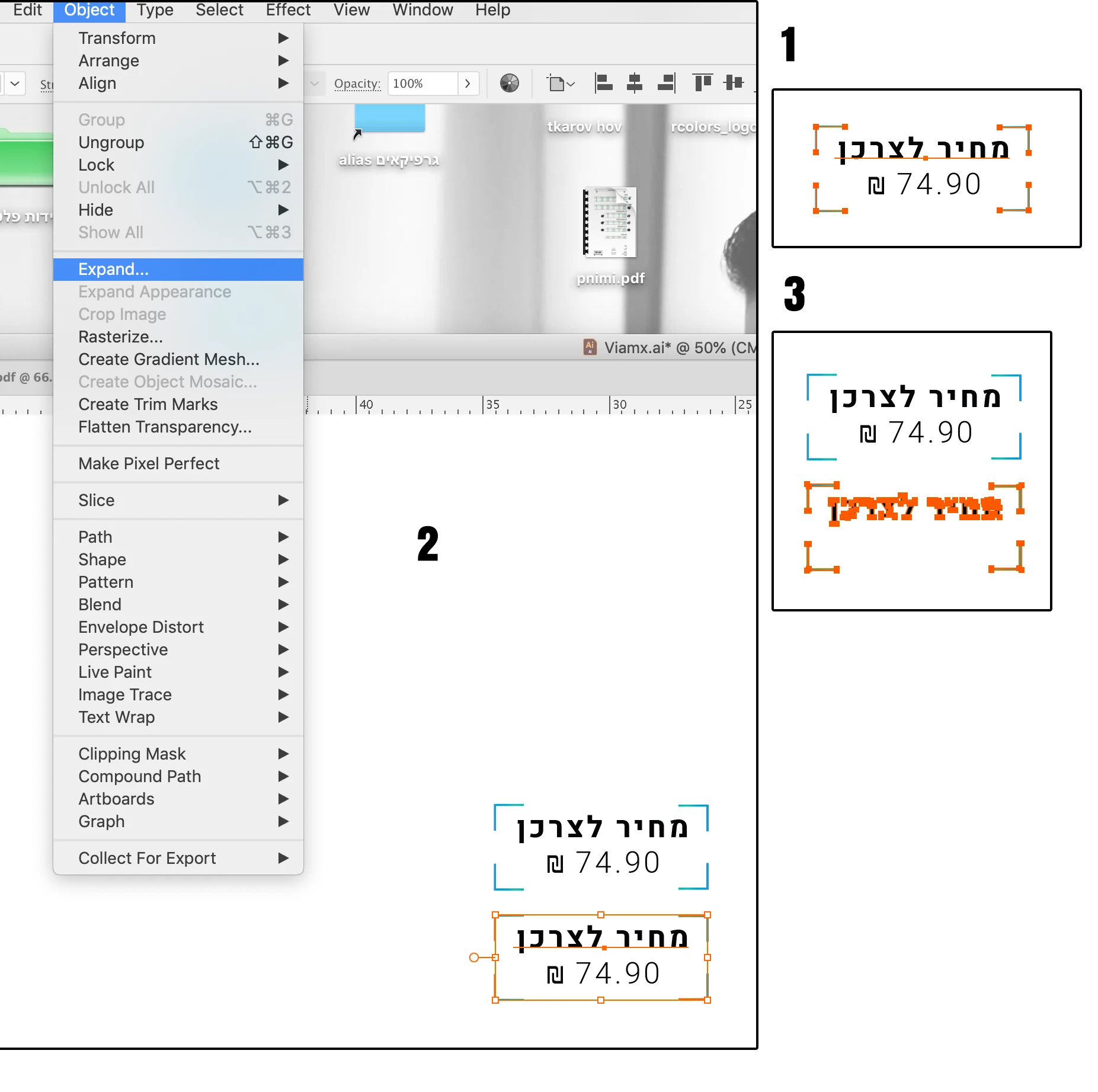
numbers disappeared after create outline illustrator!

when i type numbers in illustrator and mix it with language that is not english it disappeared after create outline...



This topic is closed to new replies. Start a new post to keep the conversation going.
Monika Gause
Monika GauseCorrect answer
Community Expert
Jul 13, 2020 8:39 PM UTC

Does it also happen when you use Object > Flatten transparency to outline fonts? You need to check the option "Outline text"

29 replies

Participant
Nov 26, 2021 9:06 PM UTC

I believe it's been fixed in Illustrator 26.01!
This issue arose in version 23 AFAICR

Translate
Participant
Jan 13, 2022 9:35 AM UTC

Sadly, we still encounter this issue in 26.0.2


A second solution we have is to copy the text -> paste in place en then convert to outline. 


Translate
Participant
Jan 27, 2022 7:46 PM UTC

Try uninstalling and setting the App Language to "English תומך עברית"  == "English with hebrew Support".
It works on my machine 🙂

Translate
Participant
Oct 18, 2021 9:11 PM UTC

WOW, thank you so much! it's working 

Translate
Participant
Oct 5, 2021 7:30 PM UTC

Had the same problem and found a solution.  I went to my fonts in Adobe Cloud and deactivated and reactivated the font that was disappearing when I tried to create outlines.  Worked after reactivating.

Translate
Eliyah Gevalt
Participating Frequently
Jun 20, 2021 12:00 PM UTC

happens to me too (hebrew. also in prices! but not only) but seldom...

Translate
Participant
Nov 17, 2020 7:14 AM UTC

Guys, I am also facing the same issue but not in Hebrew, its in English (number) itself. After creating "Threaded text" of the numbers for calendar I wanted to make creat outline and all the numbers dissapares. Here I've uploaded a few screen shots. Please help me with effective solutions. I'm using latest version of Illustrator in MAC. Thanks


Translate
Monika Gause
Community Expert
Community Expert
Nov 17, 2020 11:38 AM UTC

Did you read the complete thread? And try out everything?

Translate
Participating Frequently
Jul 13, 2020 5:48 PM UTC

This is a big problem.
I know a lot of people on Windows and Mac who have the same problem.
It causes a lot of errors, a waste of time, rejects, and loss of money.
I don't understand why Adobe is not fixing this huge bug.
Please help

Translate
Monika Gause
Community Expert
Monika GauseCommunity ExpertCorrect answer
Community Expert
Jul 13, 2020 8:39 PM UTC

Does it also happen when you use Object > Flatten transparency to outline fonts? You need to check the option "Outline text"

Translate
Participating Frequently
Jul 14, 2020 12:32 AM UTC

OMG! You've solved the problem. Hurray!

Thank you very much. I will spread the gospel until Adobe fixes the issue from within Create Outlines.

Thank you so much

Translate
Participating Frequently
Jul 7, 2020 8:33 AM UTC

It happened to me too. I worked around that by creating the numbers in seperate text box  but that's not really a solution

Translate
Mylenium
Legend
Jun 30, 2020 8:07 AM UTC

Might be a specific issue with your Hebrew and RTL writing vs. conventional Western fonts. I'd start by checking the relevant font/ glyph panels for automatic substitutions and that. If the layout changes as you toggle these options you may be able to figure out what triggers the behavior. Of course also do the obvious - try with different fonts.


Mylenium

Translate
RCOLORSAuthor
Participant
Jun 30, 2020 8:46 AM UTC

thank you,

but it's happening with every font , even with google fonts...

Translate