
Participant
October 6, 2021
Answered

Object Isn't Centered in Bounding Box

  • October 6, 2021
  • 2 replies
  • 636 views

Hi!


A bit new to Illustrator. I'm wondering why this logo is not centered to the bounding box? I would like the logo to be centered with the artboard, but am unable to propelry do so since it's positioned in the bottom right corner of the bounding box - screenshot below. 
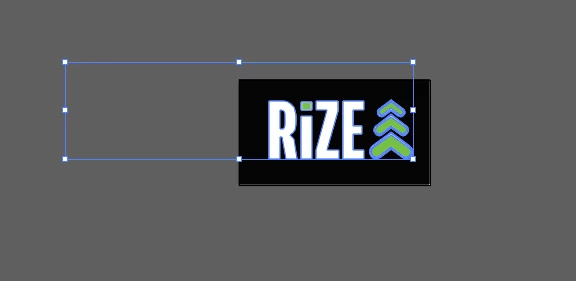
 

Correct answer SJRiegel

Maybe this is a clipping path - What does this look like in your Layers Panel (expanded) ? 


2 replies

Mike_Gondek10189183
Community Expert
Community Expert
October 6, 2021

Do a command Y to go into outline mode. Looks like you have a stray object here.

You can drag a frame with the hollow arrow tool around that area to delete, that form the group.


Comamnd Y to go back into preview mode.


Participant
October 6, 2021

Tried that, this is what happens. I'm not seeing anything in that area.


SJRiegelCorrect answer
Legend
October 6, 2021

Maybe this is a clipping path - What does this look like in your Layers Panel (expanded) ? 


Legend
October 6, 2021

There may be a loose single point grouped with your logo.

Try Object > Path > Clean Up

Choose the Stray Points checkbox and click OK. 

Participant
October 6, 2021

Drat, it said no cleanup necessary.