Inspiring
October 9, 2018
Answered

Object uneditable. cant change fill

  • October 9, 2018
  • 1 reply
  • 599 views

Illustrator CS6  version 16.0.0 local install.

I have an object / path that I just drew and I can't change the fill. The fill drop down won't drop down neither will the stroke.
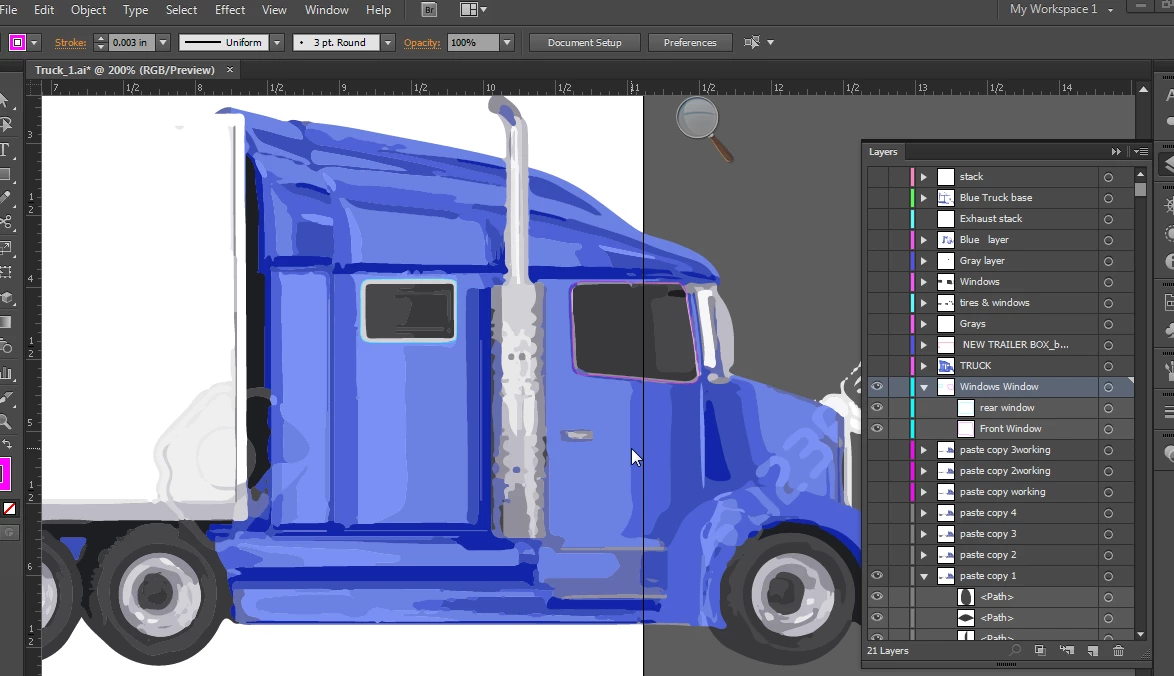
When I try to click on the dropdown it just flickers for a nanosecond and nothing else.

This topic has been closed for replies.
Correct answer roncurington

https://forums.adobe.com/people/Monika+Gause  wrote

When was your last computer restart?

Also it doesn't look like something is selected in your artwork.

Seems last night was the last restart.

It's just hard to see the object selected its a path that is on top of the front window. Has a red stroke. You can also see it in the layers pallet....

Opps I guess I didn't have the path selected. Though I selected and re selected it 6 or 7 times trying to get it to work.

Anyway it looks like it was just me not being able to get the object selected.

Thank you

1 reply

Monika Gause
Community Expert
Community Expert
October 9, 2018

When was your last computer restart?

Also it doesn't look like something is selected in your artwork.

roncuringtonAuthorCorrect answer
Inspiring
October 9, 2018

https://forums.adobe.com/people/Monika+Gause  wrote

When was your last computer restart?

Also it doesn't look like something is selected in your artwork.

Seems last night was the last restart.

It's just hard to see the object selected its a path that is on top of the front window. Has a red stroke. You can also see it in the layers pallet....

Opps I guess I didn't have the path selected. Though I selected and re selected it 6 or 7 times trying to get it to work.

Anyway it looks like it was just me not being able to get the object selected.

Thank you

Monika Gause
Community Expert
Community Expert
October 9, 2018

So you can access the color now?