
Participant
September 18, 2023
Answered

Odd Compound Path Artifact

  • September 18, 2023
  • 2 replies
  • 289 views

I'm wondering if anyone has experienced this issue with a compound path before and has a solution. I've cut out the text from a shape behind it. But it has this weird diagonal block: 



In outline view, we see that everything looks normal:
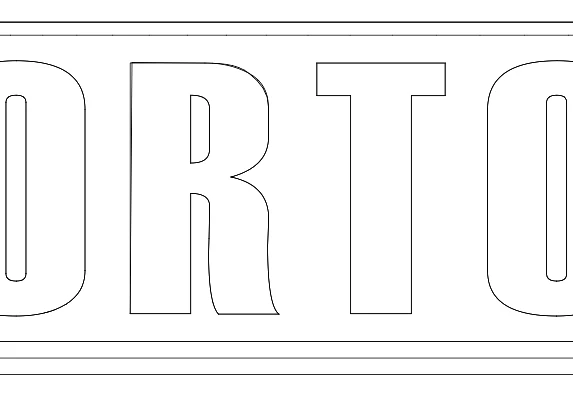
If I adjust the top-left control point for the R or T, the issues goes away.
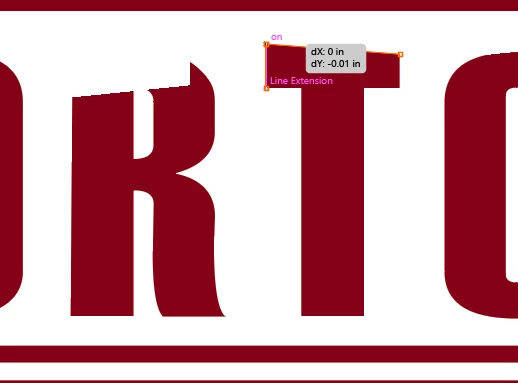

 

Any thoughts? I've tried applying another shape intersection, but since the vector outline doesn't show the artifact, nothing changes when I do that.

This topic has been closed for replies.
Correct answer Jacob Bugge

soccerkingpilot,


This is what GPU is about:
https://helpx.adobe.com/illustrator/kb/gpu-performance-preview-improvements.html

GPU is faster, sometimes too fast, so it gets ahead of itself and moves in mysterious ways.


Graphics cards are included in the system requirements:
https://helpx.adobe.com/illustrator/system-requirements.html
https://helpx.adobe.com/illustrator/system-requirements/earlier-versions.html
https://helpx.adobe.com/illustrator/system-requirements-old-versions.html


Apart from an inadequate card, the issue can be caused by lack of driver updating, lack of proper recognition of the card by the computer, and whatnot (including rifts in the space time, moon, weather, and the fact that Illy (job description Adobe Illustrator, and she is always eager to help) sometimes moves in mysterious ways herself).

2 replies

austin.tAuthor
Participant
September 18, 2023

I was having the same issue with another text box and found that if I made an extra point higher up, it also resolved the issue, as I did with the F below:


Kurt Gold
Community Expert
Community Expert
September 18, 2023

Does it get better if you take the CPU preview in the View menu?


austin.tAuthor
Participant
September 18, 2023

That did fix it. Interesting...any thoughts why?

Jacob Bugge
Community Expert
Jacob BuggeCommunity ExpertCorrect answer
Community Expert
September 18, 2023

soccerkingpilot,


This is what GPU is about:
https://helpx.adobe.com/illustrator/kb/gpu-performance-preview-improvements.html

GPU is faster, sometimes too fast, so it gets ahead of itself and moves in mysterious ways.


Graphics cards are included in the system requirements:
https://helpx.adobe.com/illustrator/system-requirements.html
https://helpx.adobe.com/illustrator/system-requirements/earlier-versions.html
https://helpx.adobe.com/illustrator/system-requirements-old-versions.html


Apart from an inadequate card, the issue can be caused by lack of driver updating, lack of proper recognition of the card by the computer, and whatnot (including rifts in the space time, moon, weather, and the fact that Illy (job description Adobe Illustrator, and she is always eager to help) sometimes moves in mysterious ways herself).