
Answered
Offset lines disappear when clipping another object/shape into said object
Hello! I’m still learning how to use Illustrator so apologies for any basic stuff I might miss.
I’m trying to make an image similar to this (this was created with another software):

As you can see, the rectangle with text is clipped into the bigger oval. Now, when I wanted to recreate the same clipping in Illustrator, the offset lines (inner straight and dotted lines) are now gone. I used the cut-draw inside-paste and get the result in right
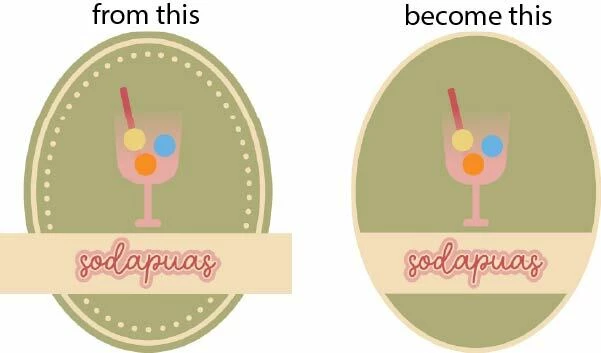
I tried a workaround by creating a new shape over the existing one, but you can see there’s a hairline gap now…

Is there any other way to make the intended result doable? The pathfinder methods to cut the rectangle also didn’t work.


 AdChoices