
Participant
January 24, 2023
Answered

Offset Path changing anchor points

  • January 24, 2023
  • 4 replies
  • 1320 views

We use AI to setup all of our files for making signs. We use it for our CNC, WaterJet, LaserCNC, Channel Letter Notcher/Bender, everything. 


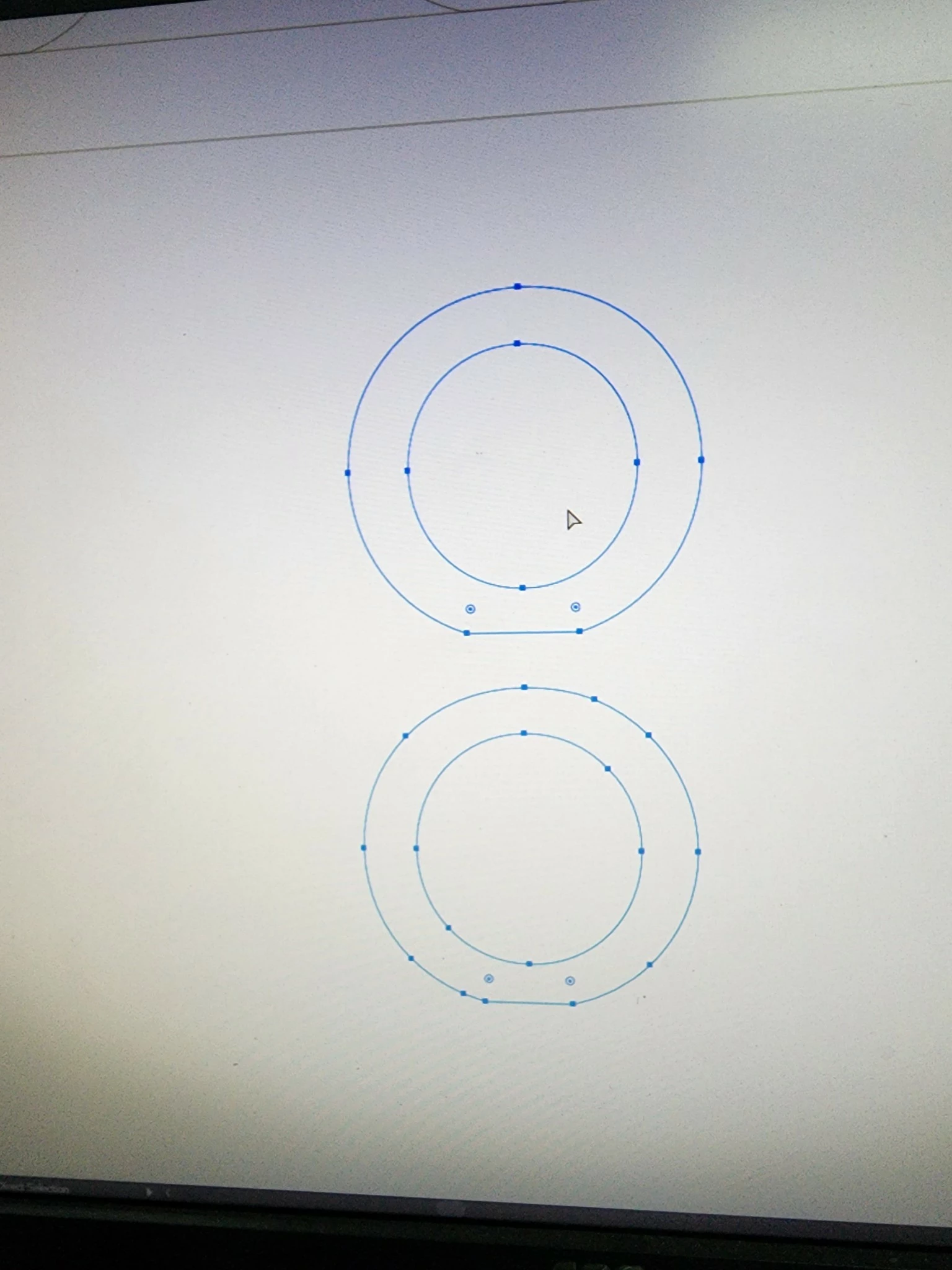
Lately when I use the Offset Path function, it's moving my anchor points all over the place and our machines are faulting out and not reading the program correctly. I've increased the miter limit, I've even tried using Round on rounded letters, and it's doing the same thing on everything. 


I thought this was a 2023 issue, but I jumped on old machines with 2021 and 2022 and it's doing the same thing now and I've tried it from multiple files from different designers. Has anyone had any issues like this?
This topic has been closed for replies.
Correct answer Jacob Bugge

Zack,


I believe the conclusion is that it has been an issue is with your sign equipment rather than with AI: AI inherently uses Beziers, and as I (mis)understand it, they must be converted by the sign equipment.


4 replies

pixxxelschubser
Community Expert
Community Expert
January 24, 2023

Hi @Zack28082381d5po 

No problem with my own testfile.


Do you have a sample file to test with a precise description of all the steps you take?


Participant
January 25, 2023

I believe it's the way the design team sent the file down to me. Seems to be beziers instead of arcs. What I had them do is recreate everything and send it back down and it is working fine now.

Jacob Bugge
Community Expert
Jacob BuggeCommunity ExpertCorrect answer
Community Expert
January 25, 2023

Zack,


I believe the conclusion is that it has been an issue is with your sign equipment rather than with AI: AI inherently uses Beziers, and as I (mis)understand it, they must be converted by the sign equipment.


Monika Gause
Community Expert
Community Expert
January 24, 2023

Can you upload a sample file for us to test?

SHould contain before and after and also the values you are using.

Jacob Bugge
Community Expert
Community Expert
January 24, 2023

Zack,


What is the difference between the top and bottom sets of paths in the image?


Participant
January 24, 2023

The nodes. Our machine reads it's bends off of the nodes and this has added them in places they shouldn't be and it's not compatable with our equipment.

Jacob Bugge
Community Expert
Community Expert
January 24, 2023

Zack,


It seems that the issue is with your sign equipment rather than with AI.


Has the issue appeared after your making an AI upgrade, and does it still work with older AI files, in other words, is the software for your machines compatible with the newest?


Doug A Roberts
Community Expert
Community Expert
January 24, 2023

Does that bottom point consist of two overlapping anchors?

Participant
January 24, 2023

The bottom "corners" were clipped off for the letters to sit ontop of a flat surface. But I'm able to clean that up no problem. It's the points it randomly adds as it goes around that I can't clean up without drastically changing the shape.