
Old EPS Files: Canvas size inconsistent between Illustrator and Photoshop
I'm attempting to preserve a pair of old EPS files made roughly 25 years ago. I'm not certain, but I suspect they were created in Illustrator. The files are roughly ~11MB in size. My goal is to determine the "true" or fullest image resolution, as well as whether there are additional layers/objects hidden within.
I opened these files in Photoshop just in case that'd work instantly, which it appeared to. The images have a resolution of 1492 pixels squared, which is larger than I could have hoped for. However, I have heard of the possibility that metadata or layers may be lost. I normally just have Photoshop because of pricing, so I opted into a 7-day trial of Illustrator just in case I'd find more layers or an even higher resolution.
This is where it gets a bit weird to me. Opening the EPS files in Illustrator, I get a large white canvas with the images shrunk down to ~350 pixels squared. I was expecting the same resolution or larger. The images appear to be a smart object, as resizing to 1492x keeps them clear. However, I can't figure out why it wouldn't be at least the same size as displayed in Photoshop. I looked for a "revert to original size" button like I'm used to in Photoshop, but I don't see anything like that in Illustrator.
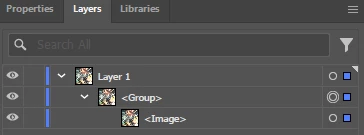
When it comes to layers, I'm not sure if this is common or not, but it seems like there's just one layer nested three levels deep. I don't know why the image creator would do that - it's for an old press release, so I assume it should've just been one flat layer instead of all that nesting. Am I missing something? I've attached a screenshot of the layer panel, in case it means anything to someone experienced in Illustrator.
I'd like help confirming whether the base image is 1492x1492 or perhaps larger, and whether there might be additional layers/objects nested in the project. Thanks in advance for any assistance.


 AdChoices