diatomdeb
Known Participant
February 15, 2025
Answered

Old illustrator file rasterised and paths outlined when opened in latest v. - how to avoid this?

  • February 15, 2025
  • 2 replies
  • 984 views

Hi, I opened an Illustrator EPS file I created dating from 2012 which contained artworks with gradient mesh, Gaussian blur along with ordinary lines with no effects. The lines became outlined and all the artworks 'broke up' with multiple squares and rasterisation of the mesh and effects = disaster. (screenshot attached of part of the file) Is there any way I can avoid this happening and recover the fully editable artworks? I am on Illustrator 29.3, Mac Studio M1 Max running Ventura 13.6.3. Thanks for any help!

Correct answer Brad @ Roaring Mouse

Open the original EPS in Text Edit and show us the first part of the header. That will show you what "version" of Illustrator created it, and a clue as to what compatibility it is, like so:
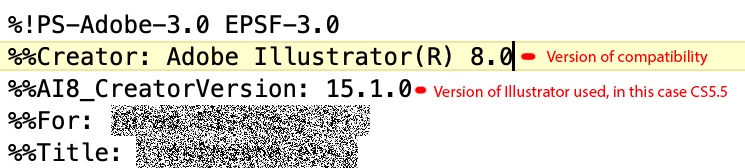
Anyway, everything in your screen grab points to this being saved as an older EPS version (i.e. my guess is before Illustrator 9). EPS does not support mesh and transparency effects without "flattening", which includes outlining strokes, and breaking up text into chunks, depending on the Transparency export setting. In fact, this is happening in any EPS version, even the most current 2020 compatibility. The default is Medium, (and most people don't even think about this setting) which does everything you are experiencing (e.g. stroke to outlines).

The difference in editabilty rests on what version of Illustrator compatibility setting was used, so the native Illustrator object structure would still exist in the file so you can reopen them and continue editing. Versions older than v9, do not support mesh and transparency objects in them, so will only open in the flattened form.

The other clue is that your text is broken up into chunks. This happens to older files saved with the pre-CS era text engine.

Is there anything you can do now? No, the damage has been done, unless you have .AI versions of those particular files around somewhere.

If you want to have one of us poke at the file, send it along.

2 replies

Brad @ Roaring Mouse
Community Expert
Brad @ Roaring MouseCommunity ExpertCorrect answer
Community Expert
February 16, 2025

Open the original EPS in Text Edit and show us the first part of the header. That will show you what "version" of Illustrator created it, and a clue as to what compatibility it is, like so:

Anyway, everything in your screen grab points to this being saved as an older EPS version (i.e. my guess is before Illustrator 9). EPS does not support mesh and transparency effects without "flattening", which includes outlining strokes, and breaking up text into chunks, depending on the Transparency export setting. In fact, this is happening in any EPS version, even the most current 2020 compatibility. The default is Medium, (and most people don't even think about this setting) which does everything you are experiencing (e.g. stroke to outlines).

The difference in editabilty rests on what version of Illustrator compatibility setting was used, so the native Illustrator object structure would still exist in the file so you can reopen them and continue editing. Versions older than v9, do not support mesh and transparency objects in them, so will only open in the flattened form.

The other clue is that your text is broken up into chunks. This happens to older files saved with the pre-CS era text engine.

Is there anything you can do now? No, the damage has been done, unless you have .AI versions of those particular files around somewhere.

If you want to have one of us poke at the file, send it along.

diatomdeb
diatomdebAuthor
Known Participant
February 16, 2025

Many thanks for your reply, Brad. Seems like the artwork was created using a template that was even older than I thought (2004) and you are correct, it was Illustrator 8.0.1 (screenshot attached) so that explains why it opened in a flattened form. 

Thanks for the offer to look at the file but I've now redrawn it as it's needed urgently, and have saved it as .ai format.And I will ditch the ancient EPS template file!

Thanks for your help!


Monika Gause
Community Expert
Community Expert
February 15, 2025

How did you save it?

If you saved it as an EPS 3, then that is what will happen. Or did you save it as an EPS with embedded editable Illustrator file?


Anyway: EPS is too dangerous as a work file format for this kind of complex artwork. Better use AI

diatomdeb
diatomdebAuthor
Known Participant
February 15, 2025

Hi Monika, thanks for replying. I don't remember what type of EPS it was saved as, as it was created back in 2012. EPS was the standard for artwork being sent to print in those days. I do use .ai now!

Monika Gause
Community Expert
Community Expert
February 15, 2025

No, EPS wasn't the standard in 2012.

EPS has been outdated since 1997 (the last time it has been updated).

PDF was the standard back then already. How do I know? I sent things into print.


If you want someone else to check out your EPS, you might share it in this forum.