Participant
January 14, 2020
Answered

open a pdf in illustrator to change something

  • January 14, 2020
  • 1 reply
  • 610 views

Hi I made a document with Illustrator a year ago. I saved it as a pdf. Now in the new Illustrator I try to open the old pdf to do some little text changes.
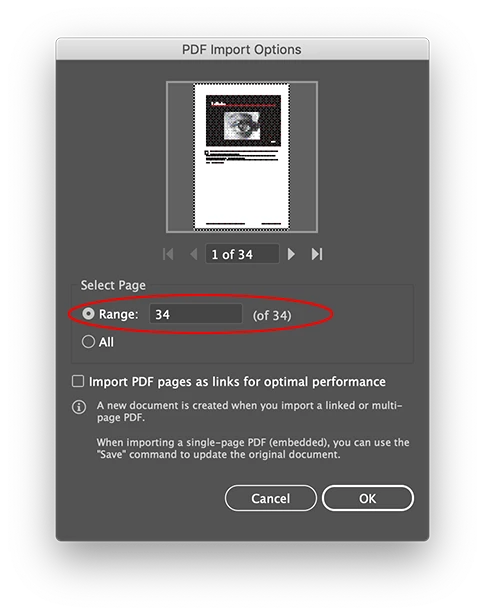
Normally you get the menu where you see the pdf and could choose the page you want to change.
If I do so and select the last page of the document, Illustrator opens the first page. Whatever I do, Illustrator shows always the first page, which page I select, the second, the third, the tenth, alsways opens the first page....

what do I wrong, or what must be done to get the right page?

bert
This topic has been closed for replies.
Correct answer Ton Frederiks

Dag Bert,

welke Illustrator versie?

En (voor de zekerheid), selecteer je de range en niet de preview pagina?

1 reply

Ton Frederiks
Community Expert
Community Expert
January 14, 2020

Do you select by Range the page you need, like 10-10 (of34)?

Legs69Author
Participant
January 14, 2020

Hi Ton, ik heb een document van 28 paginas en heb alleen wijziging in de laatste pag. ik selecteer dus 28.

daarna opent de voorpagina. maar ook als ik pag 3, of 6 of 12 selecteer, opent de voorpagina.

in eerdere versies van illustrator opende gewoon de pagina die je nodig had 🙂


Ton Frederiks
Community Expert
Ton FrederiksCommunity ExpertCorrect answer
Community Expert
January 14, 2020

Dag Bert,

welke Illustrator versie?

En (voor de zekerheid), selecteer je de range en niet de preview pagina?