Underware
Participating Frequently
November 9, 2016
Answered

Open characters styles panel by script in Illustrator (CC2014 or later)

  • November 9, 2016
  • 3 replies
  • 948 views

Hello there

I am looking for a solution to open a panel window in Illustrator by script.

In InDesign I can easily use:

app.panels.itemByName("$ID/Character Styles").visible = true;

But this is not possible in Illustrator.

Any help is highly appreciated.

Kind regards, Akiem
This topic has been closed for replies.
Correct answer o-marat

I am not certain, but it seems that there is no such events in Illustrator ExtendScript.

I think it is impossible to know the panel is visible or not via Illustrator ExtendScript.

But perhaps someone better versed and will suggest solution in this issue..

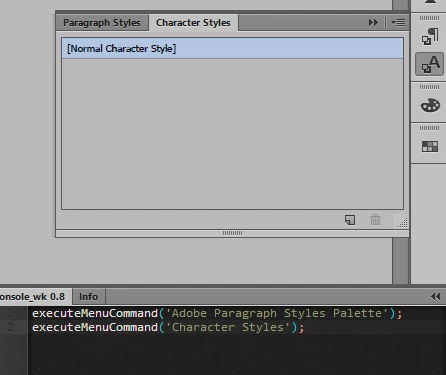
As a partial solution, you may set two panels together (for example Paragraph Styles and Character Styles), and then run this script:

executeMenuCommand('Adobe Paragraph Styles Palette');

executeMenuCommand('Character Styles');

In this case, the panel will always unfold.

3 replies

Underware
UnderwareAuthor
Participating Frequently
November 9, 2016

Excellent. This does the trick!

Underware
UnderwareAuthor
Participating Frequently
November 9, 2016

Dear o-marat

Thanks, this works perfect... but its toggling the panel.

So how is it possible to find out if the panel is visible or not?

And something else: is there something similar in Illustrator to the InDesign events afterSelectionChanged & afterSelectionAttributeChanged?

o-marat
o-maratCorrect answer
Inspiring
November 9, 2016

I am not certain, but it seems that there is no such events in Illustrator ExtendScript.

I think it is impossible to know the panel is visible or not via Illustrator ExtendScript.

But perhaps someone better versed and will suggest solution in this issue..

As a partial solution, you may set two panels together (for example Paragraph Styles and Character Styles), and then run this script:

executeMenuCommand('Adobe Paragraph Styles Palette');

executeMenuCommand('Character Styles');

In this case, the panel will always unfold.

o-marat
Inspiring
November 9, 2016

Akiem Underware, hello!

Maybe this:

executeMenuCommand('Character Styles');

Compatible CS6+

Обновлено You may find more information by keyword "executeMenuCommand" in this forum (like this topic: [JS] CS6+ executeMenuCommand )