
Participant
February 23, 2024
Answered

Opening a folder inside a .ase file

  • February 23, 2024
  • 1 reply
  • 338 views

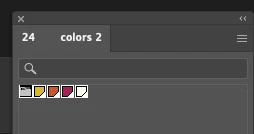
I have successfully opened my first .ase file and can see 4 individual swatches and a folder. I tried double-clicking, right-click and searched for menu options but am unable to open the folder inside the .ase file. Suggestions?
This topic has been closed for replies.
Correct answer Monika Gause

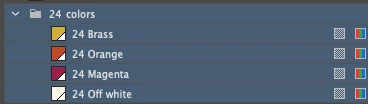
Hahaha, Monika, you're right!  I think there are only 4 swatches as shown below and the "24 colors" folder name refers to the YEAR, I thought they were being very generous with a palette of 24 colors to choose from!!

Thanks for helping out, I'd still be digging around for days trying to another 20 swatches somewhere. Hahaha.


You're welcome.

Maybe propose them to better document their files next time 😉 

1 reply

Monika Gause
Community Expert
Community Expert
February 23, 2024

THat just denotes that this is a color group.

@morphistAuthor
Participant
February 23, 2024

Yes, it does indicate that there are 24 swatches inside that folder but I can't figure out how to open that

folder

Monika Gause
Community Expert
Community Expert
February 23, 2024

There are no more swatches inside the ASE.

What are those 24? Gradients? Patterns? THey cannot be in an ASE.