
camryna10528936
Inspiring
March 3, 2023
Answered

Opening old ai files?

  • March 3, 2023
  • 3 replies
  • 3038 views

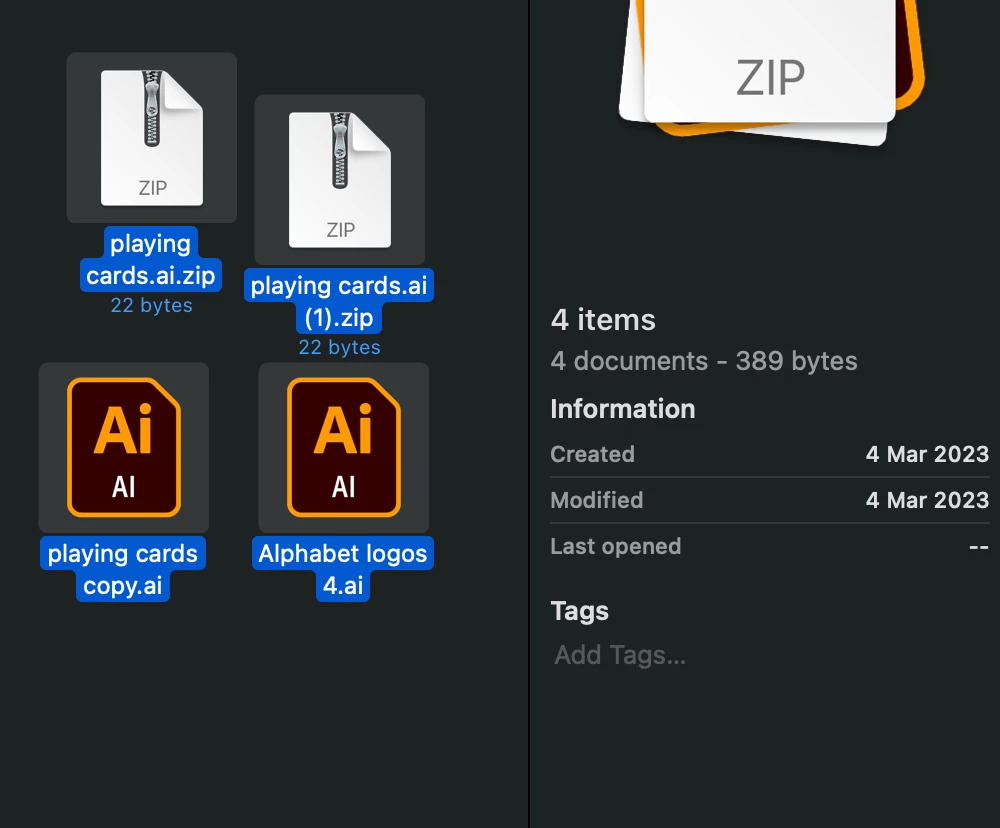
I have two files, from 2020 and 2021 that I have been unable to open. The main issue arose when my laptop broke and everything was uploaded to the cloud. When I retrieved these files from the cloud on my new laptop (with Illustrator 2023), they won't open. I don't even get an error message, or a dialogue box, or a little bouncing icon. I click and I get nothing. I tried right clicking and "open in illustrator" and still get nothing. In a last ditch effort I thought maybe they needed to be opened on the laptop they were created on. I got my old mac to work (with an hdmi cable) and went to open the files. Turns out I took them off icloud when I tried to open them on my new mac, so I didn't have the originals on the old mac anymore. I sent myself the files from my new mac to my old mac, and STILL won't open on my old mac. 


Please help. Honestly I don't need an answer for the future, I've learned my lesson on backing up files- If someone could just open these files for me and send back? Please Adobe!!! 
    This topic has been closed for replies.
    Correct answer camryna10528936

    Thanks for sharing the files, @camryna10528936. It seems like the file size collectively is very small (389 bytes), which indicates that the files were never properly synced or downloaded to your Mac.


    Unfortunately, since these files are not technically Illustrator files and were not properly synced or downloaded, there is no way to recover them.


    To prevent this issue from happening in the future, you might want to double-check that your files are properly syncing and downloading from the cloud before making any changes to them. You can also consider creating backups of your files to ensure that you don't lose any important data.


    Please feel free to reach out if you have any further questions or concerns.


    Best,

    Anshul Saini


    Thank you for all your help, I appreciate you taking the time to look into this. 

    I found an old pdf of one of them, so hopefully I can use that to recreate it, but the other one is gone gone. Lesson learned!! 

    3 replies

    Anshul_Saini
    Community Manager
    Community Manager
    March 3, 2023

    Hi @camryna10528936,


    I'm sorry to hear about the difficulties you are experiencing in opening your old AI files. I understand how important these files are to you, and I assure you that I will do my best to assist you.


    To investigate the issue further, I kindly request you share the files with me here or via DM. This will enable me to access the files and identify whether there is an issue with the files themselves or with Illustrator.


    In the meantime, I recommend checking if the files are synced correctly from the cloud. You can try downloading them to your desktop folder and checking if they open in Illustrator or not. Additionally, please ensure that the file size is adequate, as files less than 1MB may not have been synced correctly or may have become corrupted.


    I'll be looking forward to hearing back from you soon.

    Best,
    Anshul Saini

    camryna10528936
    Inspiring
    March 3, 2023

    Hi! Thank you so much. 

    I realized I have two versions of these files- one that is 46.7 MB, probably the normal file, and one that is 177 bytes. I assume the 177 bytes one is corrupted then? The problem with the normal file is that it won't upload to the adobe file sharing link you sent. When I go to click and drag it, it is greyed out? I assume this means its not downloaded from icloud correctly, but I dont see these files on my icloud anymore, I guess I must have permanently moved them onto my desktop when I originally tried to download them. I can send you the 177 bytes ones, but I doubt those will open.


    Any other ideas?

    Kevin Stohlmeyer
    Community Expert
    Community Expert
    March 3, 2023

    Hi @camryna10528936 the issue with iCloud is it not only syncs the ai file but also the temp files associated with it. The 46.7 mb is probably the original file as you noted, however the 177 bytes is either the temp file or preview associated with an AI file and is not going to help.

    Monika Gause
    Community Expert
    Community Expert
    March 3, 2023

    @Anshul_Saini can you please help?

    kglad
    Community Expert
    Community Expert
    March 3, 2023

    in the future, to find the best place to post your message, use the list here, https://community.adobe.com/


    p.s. i don't think the adobe website, and forums in particular, are easy to navigate, so don't spend a lot of time searching that forum list. do your best and we'll move the post if it helps you get responses.


    <moved from using the community>

    camryna10528936
    Inspiring
    March 3, 2023

    Hi, 

    Does "moved from using community" mean you banned my post? My post that is my last ditch effort at retrieving these files?


    I already looked through adobe forums before I posted this, or I wouldn't have done it. Every answer either tells me to download an older version (did that, didn't help) or I'm out of luck. The only shred of hope I saw was an Adobe representative that said "send me your files I'll see what I can do". Can I sign up for that? Take my post down, I don't care. But give me an Adobe employee to speak to please. I'm at my wits end, otherwise I wouldn't be here. 

    kglad
    Community Expert
    Community Expert
    March 3, 2023

    no. it means i moved your post from a forum that deals with forum issues to a forum about illustrator.