
OSX 14.1.2 keeps closing illustrator 28
I searched and couldn't find this issue. Currently using OSX 14.1.2 on a MBP.

I keep getting the following error from the OS:
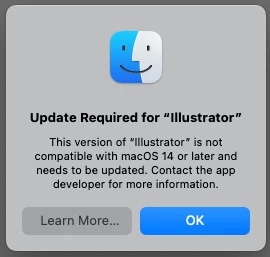
FWIW, this happened on the 2023 version of ai as well, so I updated it to the latest 2024 just to be safe. I'm still getting the above error though, which is funny because there's nothing I could update to. So I guess I'm notifying the developer. 😉
As soon as I hit ok, it closes illustrator and illustrator reports a crash (log below).
It does run for a bit before crashing. What seems to have triggered this is the document info panel. I was doing take-offs of objects by selecting all objects with the same property (around 300) and then using the document info panel w/ Objects to get a count of how many objects have the same appearance.
I just tested for a while doing other tasks and it seems to be stable though. So this might be an isolated bug. It's really unfortunate as I need this for work and use it almost daily. I switched over to a backup imac with older OS/ai to get the job done for now.
 AdChoices