Participant
August 3, 2020
Answered

Outline doesn't stay the same in illustrator although I have no stroke

  • August 3, 2020
  • 2 replies
  • 3255 views

Hi! I am using Adobe Illustrator 2020. I am working a logo and I need to scale up one square. None of them have strokes, since I made them outlines and yet, when I scale up the line doesn't stay the same. I am attaching two images: first is with the square at the same size as the others and the second is scalled up. 

Does anyone knows how to mantain the lines? Thank you!

This topic has been closed for replies.
Correct answer pixxxelschubser

You can scale your objekts while "Use Preview Bounds" is unchecked. With this (uncecked) option helps you to scale only to geometric bounds.


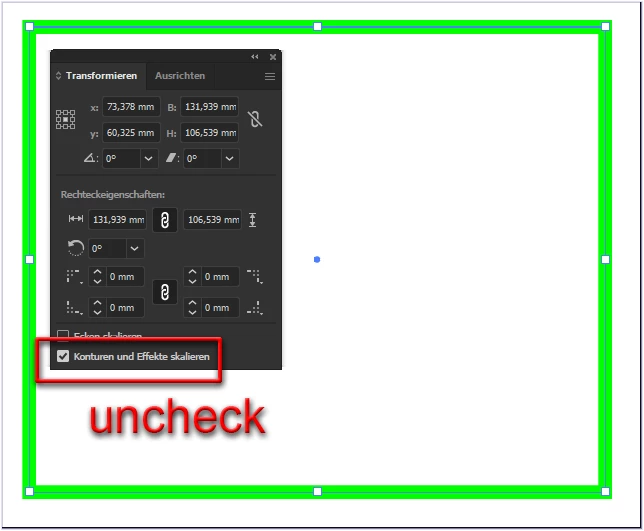
You can also deactivate "Scale strokes and effects" (as Myra has already written), but in the user interface in the Transform Panel. Then the contour thickness remains the same when scaling.


2 replies

pixxxelschubser
Community Expert
pixxxelschubserCommunity ExpertCorrect answer
Community Expert
August 3, 2020

You can scale your objekts while "Use Preview Bounds" is unchecked. With this (uncecked) option helps you to scale only to geometric bounds.


You can also deactivate "Scale strokes and effects" (as Myra has already written), but in the user interface in the Transform Panel. Then the contour thickness remains the same when scaling.


Myra Ferguson
Community Expert
Community Expert
August 3, 2020

If you have a shape and you scale it up, it all increases in size. That's what's happening here. What I think you actually want is to use a stroke and set the preferences ( Edit > Preferences> General) with Scale Strokes & Effects deselected so that when you scale a block up, the stroke stays at the same weight.